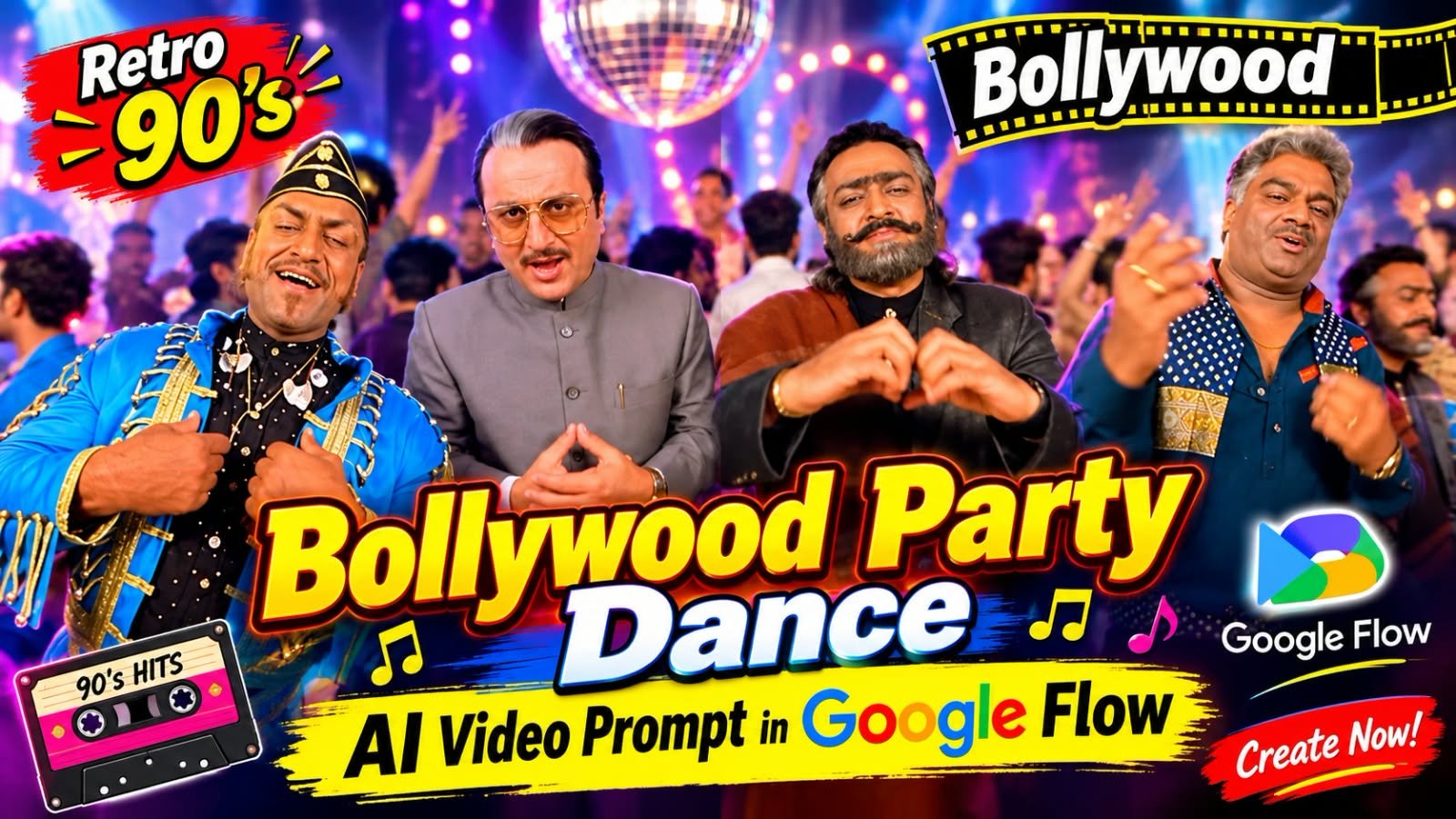
Have you seen those viral Instagram reels where a whole hall full of retro 90s style characters is dancing together?
Sharp blazers, shiny blue jackets, thick moustaches, bold scarves and a wide-angle camera that feels like an old Bollywood party song.
The best part is that you do not need a camera, a studio or even a single dancer to make this.
In this article, I will show you exactly how to create this retro Bollywood party dance video in Google Flow using one copy-paste prompt.
Is Video Mein Kya Special Hai
Ye video dekhne mein bilkul 90s ke Bollywood party song jaisa lagta hai.
Ek bada sa hall hai jisme beige walls aur lakdi ki khidkiyan hain.
Hall ke andar bahut saare log ek saath nach rahe hain.
Har character ka apna alag retro look hai.
Koi grey safari suit aur chashme mein hai.
Koi shiny blue military style jacket aur black cap mein hai.
Koi lambi daadhi aur shawl ke saath heart ka sign bana raha hai.
Koi teal shirt aur printed scarf mein masti kar raha hai.
Koi white kurta aur laal scarf mein hai.
Aur koi moustache wale uncle white shirt mein expressions de rahe hain.
Camera ka angle bhi khaas hai.
Camera bilkul characters ke paas hai aur wide-angle lens jaisa effect deta hai.
Isse video ek handheld party camera jaisa real feel deta hai.
Video vertical 9:16 format mein hai, matlab Instagram Reels aur YouTube Shorts ke liye perfect.
Ye Video Kaise Banta Hai
Ye video Google Flow mein AI se banta hai.
Aapko bas ek detailed prompt dena hota hai.
Optional mein aap ek reference photo bhi daal sakte ho, taaki apna face ya apna character video mein aa jaye.
Flow ke andar Veo video model ye prompt padhkar scene, dance moves aur camera movement khud bana deta hai.
VIDEO CONTEXT:

8 people standing in a circle, lip syncing to a song.

Camera moves from person to person one by one.

Replace ONLY the 4 characters for whom reference images are provided.

All remaining 4 characters stay exactly as they are in the original video.

CIRCLE POSITION REFERENCE:

The 8 characters are numbered 1 to 8 going around the circle.

@image1 = Position [X] in the circle

@image2 = Position [X] in the circle

@image3 = Position [X] in the circle

@image4 = Position [X] in the circle

Remaining 4 positions = Original characters — DO NOT TOUCH.

These 4 original characters remain exactly as in the source video.

No changes to their face, hair, outfit, or appearance in any way.

IDENTITY LOCK:

Replace assigned circle position characters with @image1/@image2/@image3/@image4 EXACTLY.

INDIVIDUAL CHARACTER LOCK:

@image1 face, hair, skin tone, body shape, outfit = locked. No deviation.

@image2 face, hair, skin tone, body shape, outfit = locked. No deviation.

@image3 face, hair, skin tone, body shape, outfit = locked. No deviation.

@image4 face, hair, skin tone, body shape, outfit = locked. No deviation.

UNREPLACED CHARACTERS LOCK:

The remaining 4 characters NOT covered by @image references = UNCHANGED.

Do NOT alter, reface, or modify any character that has no @image reference.

Only the 4 @image characters are replaced. Everyone else stays original.

OUTFIT LOCK:

Preserve every @image character's exact costume from their reference image.

Do NOT replace, simplify or alter any clothing element.

HAIR LOCK – CRITICAL:

Preserve exact hairstyle, hair colour, and hair length from each @image ONLY.

Do NOT apply any hairstyle or hair accessory from source video onto @image characters.

Hair comes from @image ONLY. Source video hair = completely ignored.

FACE LOCK – CRITICAL:

Each replaced character's face must come ONLY from their @image reference.

Do NOT blend, merge, or borrow any facial feature from source video characters.

@image1 face = only from @image1.
@image2 face = only from @image2.
@image3 face = only from @image3.
@image4 face = only from @image4.

Source video faces = completely blocked. Zero face bleed. Zero facial mixing.

BODY SHAPE LOCK:

Match each @image character's body proportions exactly to their reference image.

ZERO REFERENCE VIDEO INFLUENCE – ABSOLUTE:

Do NOT take ANY appearance element from the original source video characters.

This includes face, skin tone, hair, hair accessories, eye colour, outfit, body type, facial structure, or any physical feature.

The source video provides MOTION and POSITION ONLY — absolutely nothing else.

All visual identity of replaced characters comes EXCLUSIVELY from @image references.

Source video appearance data = deleted. Zero influence. Zero bleed. Zero borrowing.

BACKGROUND LOCK:

Circle formation, background environment = UNCHANGED. Do not touch.

OVERRIDE INSTRUCTION:

@image1, @image2, @image3, @image4 WIN over source video characters.

Always. In every frame. In every cut. With no exceptions whatsoever.

TEMPORAL CONSISTENCY:

All 4 replaced characters must look identical across every frame.

No face flickering. No identity drift. No partial reversion.

TEXT LOCK:

Do NOT add any subtitles, watermarks, captions, or text overlays.

Output video must be completely text-free.

GLOBAL OVERRIDE – ALL SCENES ALL CUTS:

Apply this recast to EVERY frame where any @image character appears.

NO REVERSION to original source characters at any point.

NO SOURCE VIDEO APPEARANCE DATA at any point. Ever.Required Tools
| Tool | Kis Kaam Ke Liye |
|---|---|
| Google Flow | Main video generation |
| Google Gemini | Prompt ko improve karne ke liye |
| ChatGPT | Character look ki reference image banane ke liye (optional) |
| CapCut or VN | Clips jodne, music lagane aur final edit ke liye |
Retro Bollywood Party Dance Video Prompt
Neeche wale box mein apna working prompt paste karein.
Step by Step: Google Flow Mein Video Kaise Banayein
Step 1: Google Flow Open Karo
Browser mein Google Flow open karo.
Apne Google account se login karo.
Ek new project start karo.
Step 2: Video Mode Select Karo
Project ke andar video generation option choose karo.
Agar aapke paas reference photo hai to Ingredients to Video mode use karo.
Agar sirf prompt se banana hai to Text to Video mode kaafi hai.
Step 3: Aspect Ratio 9:16 Rakho
Ye sabse important step hai.
Reels ke liye aspect ratio 9:16 vertical hi rakhna hai.
Agar 16:9 rakha to video side se chaudi aayegi aur reel mein achhi nahi lagegi.
Step 4: Prompt Paste Karo
Upar diya hua prompt prompt box mein paste karo.
Agar apna face dalna hai to apni clear front-facing photo upload karo.
Photo mein achhi lighting honi chahiye aur face bilkul saaf dikhna chahiye.
Step 5: Generate Par Click Karo
Generate button dabao aur thoda wait karo.
Ek baar mein kai options milte hain, to sabse achha wala select karo.
Dhyan rakho ki ek clip usually kuch seconds ka hi banta hai.
Step 6: Lamba Video Chahiye To Clips Jodo
Original reel lagbhag 28 second ki hai.
Itna lamba video banane ke liye 3 se 4 clips banao.
Har clip mein hall, lighting aur costume wahi rakho, bas dance move thoda change karo.
Phir sabko CapCut ya VN mein ek saath jod do.
Step 7: Music Add Karo Aur Export Karo
Edit karte waqt koi retro Bollywood style party beat lagao.
Beat ke saath cuts lagaoge to video aur bhi zyada viral lagega.
Last mein 1080p mein export karo aur Instagram par upload kar do.
Prompt Ko Improve Karne Ke Tips
Ye chhoti chhoti baatein video ka result bahut better bana deti hain.
- Costume ka colour aur style prompt mein clearly likho, jaise “shiny royal blue jacket with gold trim”.
- Camera ke liye “wide-angle handheld camera, close to the dancers” likhna mat bhulo.
- Background mein “beige hall, wooden windows, warm tungsten lighting” likhoge to 90s ka feel aayega.
- Ek saath bahut zyada characters mat rakho, 5 se 7 characters sabse safe rehte hain.
- Dance ke liye simple moves likho, jaise pointing, heart sign, shoulder shake aur hand wave.
- Result pasand na aaye to sirf ek line badlo aur dobara generate karo.
Common Mistakes Jo Avoid Karni Hain
- Prompt bahut chhota likhna, isse generic result aata hai.
- Aspect ratio 16:9 chhod dena.
- Ek hi clip mein bahut saari cheezein daal dena.
- Low quality ya blurry reference photo upload karna.
- Clips jodte waqt alag alag lighting wale clips use karna.
Kaun Se AI Tools Ke Saath Ye Kaam Karta Hai
| Tool | Video Banane Ke Liye | Best Use |
|---|---|---|
| Google Flow | Haan | Main video, sabse achha result |
| Google Gemini | Haan (Veo ke through) | Quick video aur prompt help |
| ChatGPT | Nahi | Character image banane ke liye |
| CapCut | Edit ke liye | Clips jodna, music, effects |
| VN | Edit ke liye | Free editing, beat sync |
| Midjourney | Nahi | Style reference image |
| Leonardo AI | Nahi | Character look image |
Frequently Asked Questions
Kya is retro party dance video ke liye reference photo zaruri hai?
Nahi, zaruri nahi hai.
Sirf prompt se bhi ye video ban jata hai.
Reference photo tab chahiye jab aap apne face ko is party scene mein dalna chahte ho.
Is video mein sabhi characters ke alag alag costume kaise aate hain?
Prompt mein har character ka costume alag likhna padta hai.
Jaise ek ka grey suit, ek ka blue jacket aur ek ka white kurta.
Jitna clearly likhoge utna accha match milega.
Retro party video ka wide-angle camera effect kaise milta hai?
Prompt mein “wide-angle lens, handheld camera, close to the subjects” likho.
Isse characters thode bade aur camera ke paas dikhte hain.
Yahi is video ka asli 90s party wala feel hai.
Kya 28 second ka poora video ek baar mein ban sakta hai?
Aksar nahi, kyunki ek clip kuch seconds ka hi banta hai.
Isliye 3 se 4 clips banao aur CapCut ya VN mein jod do.
Bas hall aur lighting har clip mein same rakhna.
Is video ke liye kaun sa music best rahega?
Koi bhi upbeat retro Bollywood style party beat achha lagta hai.
Copyright safe music use karo taaki reel mute na ho.
Beat ke hisaab se cuts lagaoge to result best aayega.
Kya ye video Instagram Reels aur YouTube Shorts dono ke liye chalega?
Haan, bilkul.
Video 9:16 vertical hai, to dono platforms par fit baithta hai.
Bas apni reel ka hook pehle 2 second mein rakho.
Final Words
Retro Bollywood party dance videos abhi Instagram par bahut trend kar rahe hain.
Google Flow se isse banana bahut aasaan hai, bas ek achha prompt aur thoda sa edit chahiye.
Ek baar try karo aur apna version banao.
Agar aapko ye article helpful laga to apne friends ke saath zaroor share karo.
Aise hi latest viral prompts aur templates ke liye hamara Telegram channel join karo.
Sabse pehle har naya prompt wahin milega.
Aur roz naye trending content ke liye meraprompt.com ko follow karte raho.
Rank Math SEO (Publish Se Pehle Copy Karo)
Focus Keyword: retro Bollywood party dance AI video prompt
SEO Title: Retro 90s Bollywood Party Dance AI Video Prompt in Google Flow
Meta Description: Learn how to create a viral retro 90s Bollywood party dance video in Google Flow. Copy-paste prompt, step-by-step guide and tips for Instagram Reels.
Permalink: retro-bollywood-party-dance-ai-video-prompt