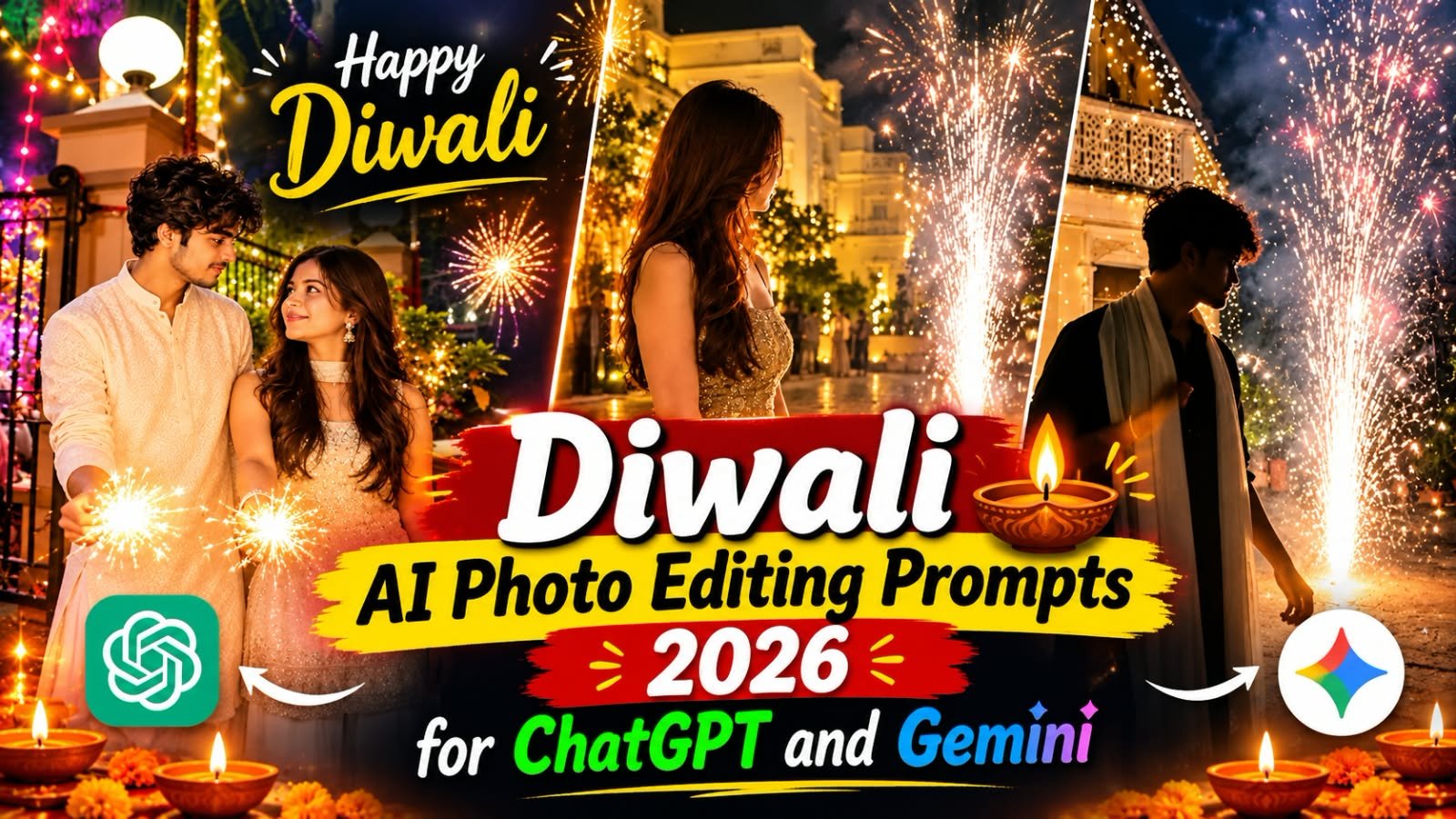
Diwali is the biggest festival of lights, and this year it falls on Sunday, 8 November 2026.
Every Instagram feed is about to fill up with glowing diyas, golden fairy lights and festive portraits.
If you want your Diwali photo to stand out, AI photo editing is the easiest way to do it.
In this guide, you will get ready-to-use Diwali AI photo editing prompts for ChatGPT and Gemini, plus a simple video idea for Google Flow.
Diwali AI Photo Trend Kya Hai?
Is Diwali par ek naya trend chal raha hai.
Log apni simple photo upload karte hain aur AI usse festive cinematic look mein badal deta hai.
Warm golden light, hazaaron diyas, rangoli aur traditional outfit, sab kuch ek prompt mein ho jata hai.
Is trend ki sabse achi baat ye hai ki iske liye kisi editing skill ki zaroorat nahi hai.
Bas photo upload karo, prompt paste karo aur result ready.
Diwali 2026 Kab Hai?
Diwali 2026 Sunday, 8 November ko hai.
Isi din Lakshmi Puja hoti hai.
Choti Diwali ek din pehle, yaani 7 November ko aati hai.
Govardhan Puja 9 November ko aur Bhai Dooj 10 November ko hai.
Matlab festival ke 4 se 5 din tak aap alag alag Diwali photos post kar sakte ho.

Create an ultra-realistic 4K DSLR nighttime Diwali rooftop photograph in vertical 9:16 ratio using the uploaded girl's photo as the EXACT identity reference. STRICT IDENTITY LOCK: Preserve her original face, facial structure, skin tone, eyes, nose, lips, hairstyle and body proportions exactly as in the uploaded photo. Do not beautify, modify or replace her face. Show her sitting on a rooftop concrete parapet, looking at beautiful golden, orange and green fireworks across the night sky. She wears an elegant red and cream traditional festive outfit with subtle jewellery. Decorate the rooftop and Indian city buildings with colourful Diwali fairy lights and glowing diyas. Natural fireworks lighting, authentic expression, realistic skin texture, cinematic nighttime photography. Keep her clearly visible from head to legs. No face changes, no extra fingers, no distorted anatomy, no CGI, no text, no watermark.
Create an ultra-realistic 4K DSLR nighttime Diwali rooftop photograph in vertical 9:16 ratio using the uploaded girl's photo as the EXACT identity reference. STRICT IDENTITY LOCK: Preserve her original face, facial structure, skin tone, eyes, nose, lips, hairstyle and body proportions exactly as in the uploaded photo. Do not beautify, modify or replace her face. Show her sitting on a rooftop concrete parapet, looking at beautiful golden, orange and green fireworks across the night sky. She wears an elegant red and cream traditional festive outfit with subtle jewellery. Decorate the rooftop and Indian city buildings with colourful Diwali fairy lights and glowing diyas. Natural fireworks lighting, authentic expression, realistic skin texture, cinematic nighttime photography. Keep her clearly visible from head to legs. No face changes, no extra fingers, no distorted anatomy, no CGI, no text, no watermark.
{
"image_type": "Ultra Realistic Night Photography",
"aspect_ratio": "9:16",
"resolution": "4K Ultra HD",
"reference_image": {
"usage": "Use the uploaded image as the primary visual and identity reference",
"identity_lock": "Preserve the exact face, facial structure, skin tone, hairstyle, moustache, body proportions and identity of the person. Do not change or beautify the face."
},
"subject": {
"gender": "male",
"pose": "Standing naturally on a road beside a large fountain firework, body slightly turned towards the firework, head tilted down, looking at the sparks",
"expression": "Natural, calm and candid expression",
"hairstyle": "Thick black hair with a voluminous textured top and short faded sides",
"outfit": {
"shirt": "Black and white small-checkered oversized button-up shirt, sleeves rolled up to elbows, top buttons open",
"pants": "Loose-fit light blue washed baggy denim jeans",
"shoes": "White sneakers"
},
"accessories": [
"Silver wristwatch on left wrist",
"Simple bracelet on right wrist",
"Thin chain necklace"
]
},
"firework": {
"type": "Large ground fountain firework",
"position": "On the road to the left side of the person",
"effect": "Bright golden and white sparks shooting vertically and spreading outward in multiple directions",
"smoke": "Thick white and grey smoke rising behind the person and filling the middle background",
"lighting": "Firework sparks illuminating the person's shirt, face, hands and surrounding road with warm golden light"
},
"background": {
"location": "Modern urban city street at night",
"buildings": "Tall glass skyscrapers with illuminated golden windows",
"signboard": "A glowing golden building sign reading THE ICONIC",
"streetlights": "Tall street lamps glowing brightly in the background",
"environment": "Dark night sky, empty asphalt road, distant city lights and realistic fireworks smoke"
},
"camera": {
"shot_type": "Full body vertical portrait",
"angle": "Eye-level slightly wide-angle smartphone photography",
"composition": "Person positioned on the right side, fountain firework on the left side",
"lens": "35mm",
"focus": "Sharp focus on the person and firework",
"depth_of_field": "Natural realistic background depth"
},
"lighting": {
"style": "Cinematic night photography",
"main_light": "Bright golden firework illumination",
"secondary_light": "White streetlights and warm building lights",
"contrast": "Natural high contrast",
"atmosphere": "Dramatic, festive and realistic"
},
"quality": {
"style": "Photorealistic DSLR photography",
"details": "Realistic skin texture, natural fabric details, accurate hands, realistic smoke and individual firework sparks",
"color_grading": "Dark cinematic night tones with warm golden highlights",
"sharpness": "Ultra detailed",
"noise": "Natural low-light camera grain"
},
"negative_prompt": [
"Cartoon",
"Anime",
"Artificial CGI look",
"Face distortion",
"Different identity",
"Extra fingers",
"Deformed hands",
"Extra limbs",
"Wrong outfit",
"Blurred subject",
"Overexposed fireworks",
"Fake smoke",
"Daylight",
"Watermark",
"Instagram interface",
"Phone status bar",
"Comment section",
"Unwanted text"
]
}
PROMPT ⬇️


Create an ultra-realistic, high-quality cinematic portrait of a beautiful young South Asian woman celebrating a festive evening, surrounded by warm golden fairy lights and glowing sparkler light trails. The photograph should look like a real professional DSLR photograph, with natural skin texture, realistic lighting, and a dreamy golden-hour aesthetic.

FACE & EXPRESSION: Preserve the exact facial identity of the person in the reference image. Maintain her original facial structure, face shape, eyes, nose, lips, natural skin tone, and all distinctive facial features. Do not beautify, reshape, smooth, whiten, or replace her face. She has softly defined eyebrows, expressive dark brown eyes, subtle winged eyeliner, warm blush on her cheeks, and muted terracotta-rose lipstick. Her expression is gentle, confident, and graceful, with a subtle closed-mouth smile. Her eyes are looking toward the left side of the frame.

HAIRSTYLE: Long, dark brown to black hair, worn open with a soft middle part. The hair falls naturally over both shoulders, with most of the length cascading over her right shoulder. Add a few delicate, naturally loose strands framing her face. Hair should have realistic texture, natural volume, and soft highlights from the surrounding lights.

OUTFIT: She is wearing an elegant traditional Indian saree in a muted olive-grey or sage-grey shade, draped gracefully around her waist and across her torso. Pair it with a fitted, deep forest-green blouse featuring a sweetheart-shaped neckline, long sleeves, and tiny golden embellishments scattered across the fabric. The saree has soft pleats, delicate fabric folds, subtle shimmer, and a luxurious flowing texture.

JEWELLERY: Small, elegant gold hoop earrings with delicate decorative details. Keep the jewellery minimal and sophisticated.

POSE & BODY POSITION: Capture her in a natural, candid, three-quarter body pose. Her upper body is turned slightly toward the camera while her face is turned to her left. Her left arm extends gently outward toward the right side of the frame, with her palm facing upward in a relaxed, graceful gesture. Her other hand holds a lit sparkler near her waist, slightly toward the lower-left side of the frame. Her posture is relaxed, feminine, and elegant.

SPARKLER EFFECT: A bright, glowing handheld sparkler emits warm golden-white sparks near her waist. Tiny luminous particles scatter naturally around the sparkler, creating beautiful bokeh and a magical festive atmosphere. The sparkler should appear realistically bright, with controlled highlights and subtle light reflecting on her hands, saree, and blouse.

BACKGROUND & LIGHTING: A dark, warm-toned indoor festive setting filled with numerous golden fairy lights. Long golden light trails curve and sweep diagonally across the background and foreground, creating a dreamy long-exposure photography effect. Add scattered circular bokeh lights of different sizes, with a few intensely glowing bulbs. The background should be softly blurred, with rich amber, caramel, bronze, and golden-brown tones. Use warm cinematic lighting that illuminates her face naturally and creates a soft golden rim light around her hair and shoulders.

CAMERA & COMPOSITION: Vertical 9:16 portrait orientation, medium-full shot showing her from the head to approximately the knees, with her extended arm visible. Position the woman slightly left of center, leaving enough space on the right for her extended hand and flowing golden light trails. Use an 85mm portrait lens, f/1.8 aperture, shallow depth of field, creamy background bokeh, realistic skin pores, sharp facial focus, and softly diffused highlights.

COLOUR GRADING & PHOTOGRAPHY STYLE: Warm amber-gold cinematic colour grading, rich shadows, soft highlights, realistic contrast, subtle film grain, natural skin tones, and a luxurious festive editorial aesthetic. The image should feel like an authentic candid photograph taken during an Indian festive celebration, not a painting, illustration, or artificial AI-generated image.

QUALITY: Photorealistic, highly detailed, natural anatomy, realistic hands and fingers, physically accurate fabric folds, authentic sparkler light, professional DSLR photography, high dynamic range, 8K-level detail.

IMPORTANT: Maintain the exact face identity from the reference photo. Do not change the facial structure or natural skin tone. Avoid plastic skin, excessive retouching, exaggerated makeup, distorted fingers, extra limbs, artificial facial features, oversaturated colours, text, watermarks, and logos.

Aspect ratio: 9:16.


Follow for more! ✨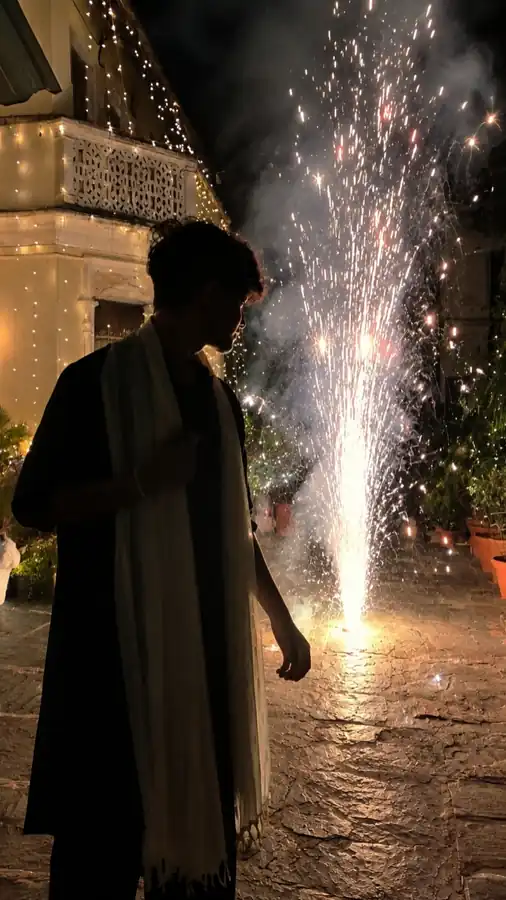
Use the uploaded photo as the strict face reference. Preserve the exact facial identity, skin tone and hairstyle. Create an ultra-realistic cinematic vertical night photograph (9:16) of a young Indian man standing outdoors during a Diwali celebration in a natural candid side-profile pose. He stands in the left foreground in a nearly full-body view, facing a brightly exploding fountain firework on his right. He has naturally tousled, voluminous black hair and a slim build. His face is partially hidden in deep shadow from strong backlighting, and his head is slightly tilted down as he watches the fireworks. One hand gently holds the scarf near his chest and the other arm hangs naturally. He wears a simple oversized black kurta with a long, lightweight ivory-white stole draped loosely around his neck, both ends hanging almost to his ankles, a subtle silver bracelet and black shoes. A large, intensely bright ground fountain firework erupts on the right, throwing hundreds of white, golden and slightly reddish sparks high into the night sky, with glowing trails, smoke clouds and falling embers. The firework backlights his hair, shoulders and scarf and lights the stone ground below with warm golden reflections. In the upper-left background is a traditional Indian heritage-style house decorated with warm-white Diwali fairy lights on its balconies, pillars and railings. The courtyard has an old irregular stone floor, and terracotta flower pots with green plants line the far right. Medium-wide full-body framing with the subject on the left half and the fireworks on the right half, camera at chest height. Authentic handheld smartphone night photography, subtle grain, natural skin and fabric texture, no HDR look, no beauty filter, no extra people, no text or watermark, 8K detail.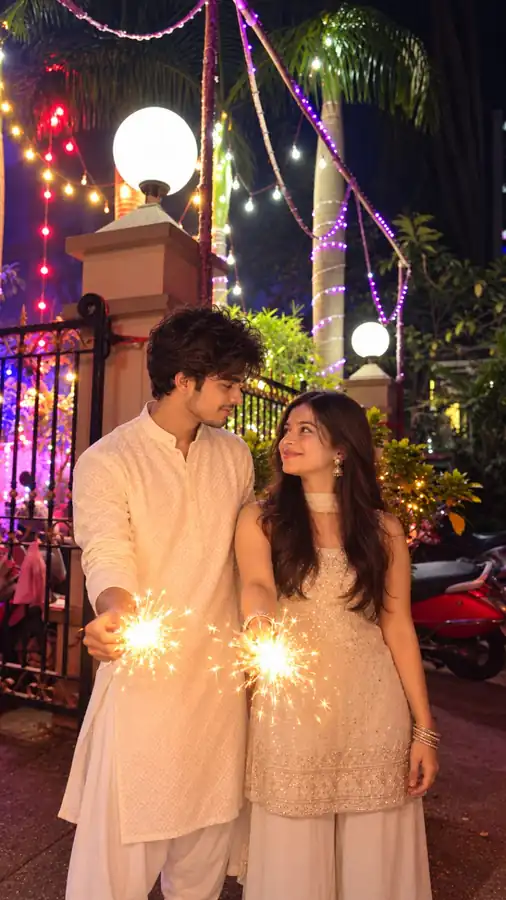
Use the uploaded couple photo as the strict face reference for both people and keep both faces 100% the same. Create a photorealistic vertical night portrait (9:16) of a young Indian couple celebrating Diwali outdoors, standing close together in the center of the frame, each holding lit sparklers. The warm sparkler glow lights both of them. The man on the left has stylish dark hair and wears a cream textured diamond-pattern kurta with white churidar, smiling as he looks at the woman. The woman on the right has long dark wavy hair and wears a sleeveless light beige embroidered short kurti with matching palazzo pants, a sheer dupatta around her neck and large traditional jhumka earrings, looking up at him with a soft smile. It is a romantic, candid moment. The background is a festive house entrance with a black metal gate, stone pillars topped with large round white globe lights, colorful red, yellow and white string lights overhead, purple fairy lights wrapped around tall palm trunks, lush green plants and a partially visible red scooter on the right, all under a dark night sky. Festive bokeh, warm cinematic tones, ultra detailed, sharp focus, eye-level medium shot, natural skin texture, no beauty filter.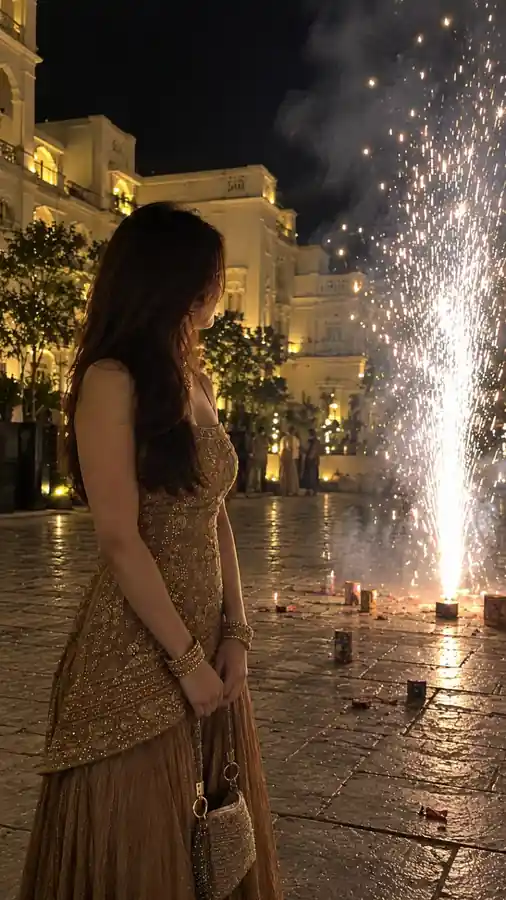
Create an ultra-realistic vertical 9:16 iPhone photo matching the reference. A young woman stands on the left, facing a bright fountain firework on the right. Her face is mostly silhouetted with warm rim lighting, and she has thick, dark hair. She wears the exact same outfit as shown in the reference picture. A grand cream-colored building with golden lights fills the background, while white-silver fireworks light up the dark sky and the stone ground. Preserve the original pose, outfit, proportions and composition. Keep her real facial identity, skin tone and hairstyle from the uploaded photo. Natural night lighting, realistic shadows, no beauty filters or artificial effects.Before You Start
Kuch cheezein ready rakh lo.
Ek clear front-facing photo, jisme face ke upar light achi ho.
ChatGPT ya Google Gemini ka account.
Photo mein sunglasses ya heavy filter na ho, warna face match kamzor aata hai.
Diwali AI Photo Prompt 1: Traditional Diya Portrait
Ye sabse popular look hai.
Aap hath mein diya pakde ho aur chehre par warm golden glow aa raha ho.
Traditional kurta ya saree ke saath ye bahut sundar lagta hai.
Diwali AI Photo Prompt 2: Rangoli and Diyas Look
Isme aap ghar ke aangan mein rangoli ke paas baithe ho.
Charo taraf chhote chhote diyas jal rahe hain.
Ye look family aur solo dono photos ke liye perfect hai.
Diwali AI Photo Prompt 3: Couple Diwali Photo
Couples ke liye ye trend bahut viral hai.
Dono traditional outfit mein, hath mein diya aur peeche fairy lights.
Romantic aur festive feel ek saath aata hai.
Diwali AI Photo Prompt 4: Rooftop Fairy Lights Portrait
Raat ke time rooftop par khade ho aur peeche pura sheher roshni se jagmaga raha hai.
Aasman mein door crackers ki light dikh rahi hai.
Ye cinematic look Instagram reels ke cover ke liye best hai.
Diwali AI Photo Prompt 5: Boys Festive Kurta Look
Boys ke liye simple lekin stylish option.
Silk kurta, golden border aur peeche diyon ki lines.
Profile picture ke liye bhi ye bahut accha rehta hai.
Diwali AI Photo Prompt 6: Girls Lehenga and Diya Glow
Girls ke liye ye sabse trending prompt hai.
Rich lehenga ya silk saree, jewellery aur diyon ka soft glow.
Light bokeh background photo ko premium feel deta hai.
Diwali AI Photo Prompt 7: Family Lakshmi Puja Photo
Puja ke time ki family photo ko AI se aur khoobsurat banao.
Pooja thali, marigold flowers aur Lakshmi Ganesh ki murti ke saath.
Ye photo family WhatsApp group ke liye perfect rehti hai.
Diwali AI Video Prompt for Google Flow
Photo ke baad ab video ki baari.
Apni Diwali photo ko Google Flow mein daalo aur chhota sa animated reel bana lo.
Diyas halke se hilte hain, lights twinkle karti hain aur aap smile karte ho.
10 second ka video Instagram Reels ke liye best rehta hai.
Step by Step: Diwali AI Photo Kaise Banaye?
Ye process bahut simple hai.
- ChatGPT ya Google Gemini open karo.
- Apni clear photo upload karo.
- Upar diye gaye prompts mein se apna favourite prompt copy karo.
- Prompt paste karke send karo.
- Result pasand na aaye to ek line add karo, jaise “make the lighting warmer”.
- Final image download karo aur Instagram par post karo.
Agar video banana hai to final photo ko Google Flow mein upload karo aur video prompt paste kar do.
Best AI Tools for Diwali Photos and Videos
Har tool ka apna kaam hai.
Neeche table mein simple comparison hai.
| Tool | Best For | Free Option | Difficulty |
|---|---|---|---|
| ChatGPT | Face match ke saath photo editing | Limited | Easy |
| Google Gemini | Quick festive portraits | Yes | Easy |
| Google Flow | Photo se video banana | Limited | Medium |
| CapCut | Video edit, music aur templates | Yes | Easy |
| VN | Reels editing, no watermark | Yes | Easy |
| Midjourney | Artistic Diwali artwork | No | Hard |
| Leonardo AI | Detailed festive illustrations | Limited | Medium |
Beginners ke liye ChatGPT ya Gemini se shuru karna sabse achha hai.
Video ke liye Google Flow ke baad CapCut ya VN mein edit kar lo.
Pro Tips for Perfect Diwali AI Photos
Ye chhoti chhoti cheezein result bahut better bana deti hain.
- Warm light wali photo upload karo, result zyada natural aata hai.
- Prompt mein “keep my face exactly the same” zaroor likho.
- Diyas ki sankhya mention karo, jaise “many small diyas”, taki frame bhara hua lage.
- Background mein bokeh lights maango, isse photo premium lagti hai.
- Ek hi photo ke 3 se 4 version banao aur best wala post karo.
- Post karte time Diwali ke trending hashtags aur song ka use karo.
- Photo 4:5 ratio mein save karo, Instagram par ye sabse accha dikhta hai.
Diwali AI Photo Editing FAQs
Diwali AI photo editing prompt kya hota hai?
Ye ek text instruction hota hai jo AI ko batata hai ki aapki photo ko Diwali ke festive look mein kaise badalna hai.
Isme diya, rangoli, lights aur outfit jaisi cheezein likhi jati hain.
Diwali 2026 mein ye trend kab tak chalega?
Diwali 8 November 2026 ko hai.
Ye trend usse kuch din pehle se lekar Bhai Dooj, yaani 10 November tak sabse zyada chalta hai.
Diwali photo ke liye kaunsa outfit prompt mein likhna chahiye?
Boys ke liye silk kurta ya sherwani achhi lagti hai.
Girls ke liye lehenga ya silk saree best rehti hai.
Colors mein gold, maroon, orange aur royal blue Diwali ke liye perfect hain.
Kya couple Diwali photo ek hi prompt se ban jati hai?
Haan, bas dono ki photo ek saath upload karo ya ek couple photo use karo.
Prompt mein “keep both faces exactly the same” likh do.
Diwali photo mein diya ka glow natural kaise aayega?
Prompt mein “soft warm glow from diyas on the face” likho.
Isse light diyon se aati hui lagti hai aur photo real feel deti hai.
Kya Diwali AI photo ke liye paid plan chahiye?
Zaroori nahi hai.
Gemini ke free version mein bhi aap achhe Diwali portraits bana sakte ho.
ChatGPT mein free limit hoti hai, to roz kuch hi images ban paati hain.
Diwali AI photo ko reel mein kaise badle?
Final image ko Google Flow mein upload karo aur video prompt paste karo.
Phir CapCut ya VN mein music aur text add karke reel ready kar lo.
Final Words
Diwali ka festival roshni aur khushiyon ka hota hai.
AI ke saath aap apni photo ko bhi utna hi khoobsurat bana sakte ho.
Upar diye gaye prompts try karo, apna favourite pick karo aur Diwali ki photo post karo.
Aap sabko Diwali 2026 ki dher saari shubhkamnayein.
Join Our Telegram Channel
Aise hi trending AI prompts, CapCut templates aur VN codes sabse pehle paane ke liye hamara Telegram channel join karo.
Naya prompt aate hi sabse pehle wahan milega.
Instagram par bhi MeraPrompt ko follow karna mat bhoolna.