Long exposure photography ek aisa trend hai jo normal photos ko ek hi second mein dramatic aur artistic bana deta hai. Ab yeh effect professional camera ya editing skills ke bina bhi possible hai — sirf Instagram Restyle aur ek simple AI prompt se. Is article mein hum aapko exact prompt, step-by-step process aur kuch pro tips denge jisse aap apni photo mein motion blur aur vintage film wala look easily create kar sakte ho.
📸 Long Exposure Photo Editing Kya Hota Hai?
Long exposure photography mein movement ko soft blur ya trail ke form mein capture kiya jata hai.
Isse photo mein ek dynamic aur artistic feel aa jati hai.
Instagram Restyle ke through ab aap apni existing photo par yeh visual effect describe kar sakte ho.
AI transformation subject par motion add karta hai, lekin face aur important details ko intact rakhta hai.
Final result thoda alag ho sakta hai — depend karta hai original photo aur restyle options par.
✨ Best Long Exposure Instagram Restyle Prompt
Apni uploaded photo ke saath yeh prompt use karo:
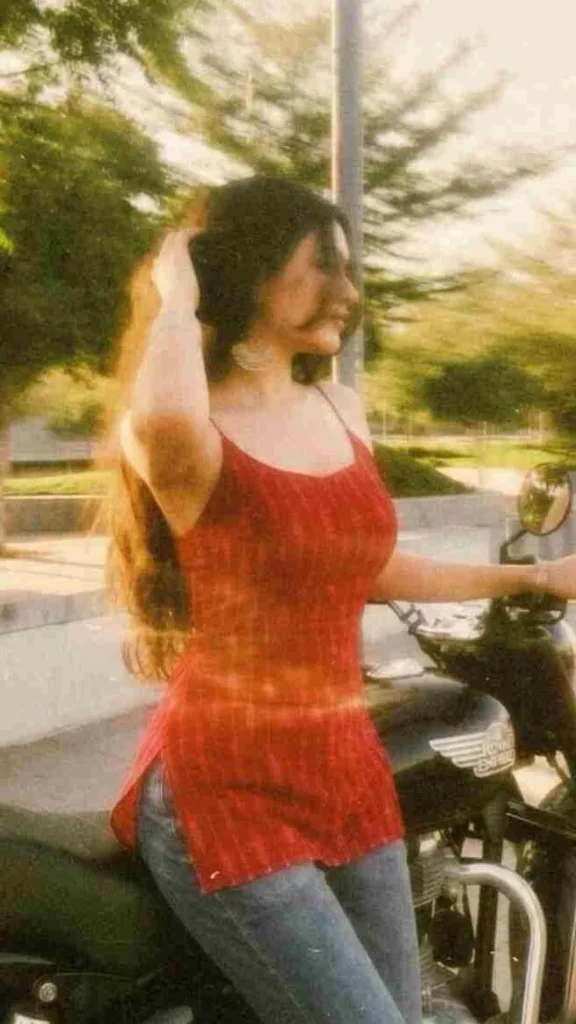
Add strong realistic long-exposure across the entire subject as if captured while moving, vintage film aesthetic, natural lighting, land unchanged facia eatures.Prompt ko Instagram app ke Restyle option mein directly paste kar sakte ho.
🛠️ Long Exposure Photo Kaise Banaye – Step by Step
- Instagram app open karo apne device par.
- Jo photo transform karni hai, use select karo.
- Restyle option open karo.
- Apna desired style describe karne wala option choose karo.
- Upar diya gaya long-exposure prompt copy karo.
- Prompt ko apni photo ke saath paste ya enter karo.
- Image generate karo.
- Motion effect aur facial details carefully check karo.
- Final photo save kar lo.
🖼️ Sahi Photo Kaise Choose Karein
Original photo hi final long-exposure effect decide karta hai.
Aisi photo use karo jisme face, clothing aur body clearly visible ho.
Simple background wali photo effect ko aur zyada stand out karti hai.
Walking pose, fashion shots aur outdoor portraits is style ke liye best rehte hain, kyunki inme naturally movement suggest hota hai.
Bahut zyada blurry ya low-quality photo avoid karo, kyunki AI ko details maintain karne mein dikkat ho sakti hai.
🎯 Background Ko Unchanged Kaise Rakhein
Agar aap chahte ho ki motion effect sirf person par focus rahe, toh prompt mein clearly mention karo ki background unchanged rehna chahiye.
Isse original environment maintain rehta hai aur sirf subject par motion effect apply hota hai.
Consistent background hone se movement aur bhi zyada noticeable lagta hai.
Agar generation ke time background change ho jaye, toh Restyle se background, surroundings aur composition preserve karne ke liye specifically ask karo.
🌟 Realistic Long Exposure Effect Kaise Paayein
Is style ka goal hai visible movement create karna, bina photo ko excessively blurry banaye.
Smooth aur controlled motion trails ke liye ask karo, aur face ke important details recognizable rakho.
Ek subtle vintage film look add karne se character aata hai, bina main effect ko overpower kiye.
Agar first result zyada blurred lage, toh next prompt mein motion intensity kam kar do.
Natural lighting, realistic shadows aur balanced exposure ke liye bhi ask kar sakte ho — isse image professionally captured jaisi lagti hai.
💡 Pro Tips Better Results Ke Liye
- Ek time par sirf ek chhota change karo — jaise stronger motion, softer trails, ya clearer facial features.
- Har generation ke baad eyes, face, hands, clothing aur background carefully check karo.
- Agar koi detail off lage, toh specifically usi area ko correct karne ke liye ask karo.
- Multiple variations try karo taaki apne liye best matching version mil sake.
- Save ya share karne se pehle final image ko dhyan se review zaroor karo.
🤖 Kaunsa AI Tool Best Hai Long Exposure Effect Ke Liye?
| AI Tool | Long Exposure Suitability | Best For |
|---|---|---|
| Instagram Restyle | ⭐⭐⭐⭐⭐ | Direct in-app editing, quick results |
| ChatGPT (Image) | ⭐⭐⭐⭐ | Detailed prompt control |
| Google Gemini | ⭐⭐⭐⭐ | Photorealistic motion blur |
| Google Flow | ⭐⭐⭐ | Video-based motion extension |
| Midjourney | ⭐⭐⭐⭐ | Artistic, cinematic trails |
| Leonardo AI | ⭐⭐⭐ | Stylized long exposure looks |
| CapCut | ⭐⭐⭐ | Adding motion blur in reels/videos |
| VN | ⭐⭐⭐ | Video motion effects, transitions |
❓ FAQs
Q1. Long exposure Instagram Restyle prompt kaam karne ke liye kaisi photo best rehti hai?
Clear face, simple background aur thoda movement-suggesting pose (jaise walking ya fashion shot) wali photo sabse best result deti hai.
Q2. Agar background bhi change ho jaye toh kya karein?
Prompt mein clearly likho ki background, surroundings aur composition unchanged rehna chahiye.
Q3. Agar photo bahut zyada blurry ban jaye toh kya karein?
Next attempt mein motion intensity kam karne ke liye prompt adjust karo aur “controlled motion trails” jaisa wording use karo.
Q4. Kya yeh effect sirf Instagram Restyle mein hi possible hai?
Nahi, aap yeh same concept ChatGPT, Gemini ya Midjourney jaise tools mein bhi try kar sakte ho, bas prompt thoda adjust karna padega.
Q5. Long exposure effect kis type ki photos ke liye sabse zyada trend kar raha hai?
Aajkal walking street shots, fashion portraits aur outdoor aesthetic photos par yeh effect Instagram par sabse zyada viral ho raha hai.
📲 Aise hi trending AI photo editing prompts, CapCut templates aur viral Instagram styles sabse pehle paane ke liye humara Telegram channel join karo — link bio mein hai!