
In this post is will give you a viral artistic photo editing prompts for Instagram stroy, feed and reels .
viral Instagram Al photo editingprompts are designed to help you create ultra-realistic, stylish, and scroll-stopping images that shine on any feed. Get ready to take your content to the next level with creativity, elegance, and professional-level polish
Turn normal selfies into stylish, viral realistic portraits with 10 Google Gemini Al photo editing prompts for girls. Copy-paste, keep your real face, and get 4K/8K cinematic edits.
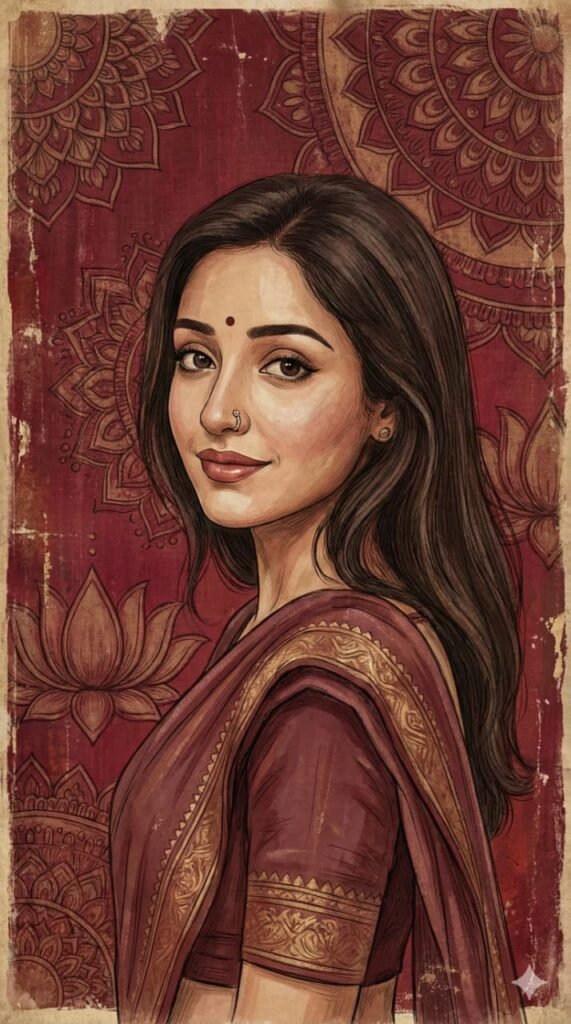
Vertical artistic portrait using the uploaded image as a hard identity lock. Preserve exact face: same facial structure, skin tone, eye shape, eyebrows, nose, lips, hairline, hair texture. No beautification. No face change. Vertical frame 9:16. Medium close-up. Subject turned slightly sideways, head gently rotated back toward the camera, over-the-shoulder feel. Eyes looking directly at the viewer with a calm, composed gaze. Expression neutral to soft. Natural feminine posture. Foreground subject sharply defined. Skin rendered in a painterly illustrated style, not photorealistic. Visible brush strokes, fine linework, soft texture. Maintain realistic facial planes adapted to a female face. Hair unchanged from the uploaded image, softly textured, natural fall. Clothing simple and traditional-toned, blending with the artwork (no modern logos). Background: deep maroon and crimson red, textile-inspired surface with intricate hand-drawn mandala and lotus motifs, Indian miniature / folk mural style. Aged parchment texture, distressed paint, subtle grain and wear. Color palette: deep reds, maroons, warm browns, muted beige highlights, soft gold undertones. Lighting: soft ambient, evenly diffused, gentle shadows, matte finish. No harsh contrast. No glow. Art style: Indian classical art fusion, folk art texture, vintage mural aesthetic, digital painting. Ultra-high resolution, vertical wallpaper format, cinematic composition. No text. No watermark. Clean edges. Negative constraints: no photorealism, no HDR, no plastic skin, no symmetry correction, no pose exaggeration, no heavy makeup, no modern props, no background blur, no typography.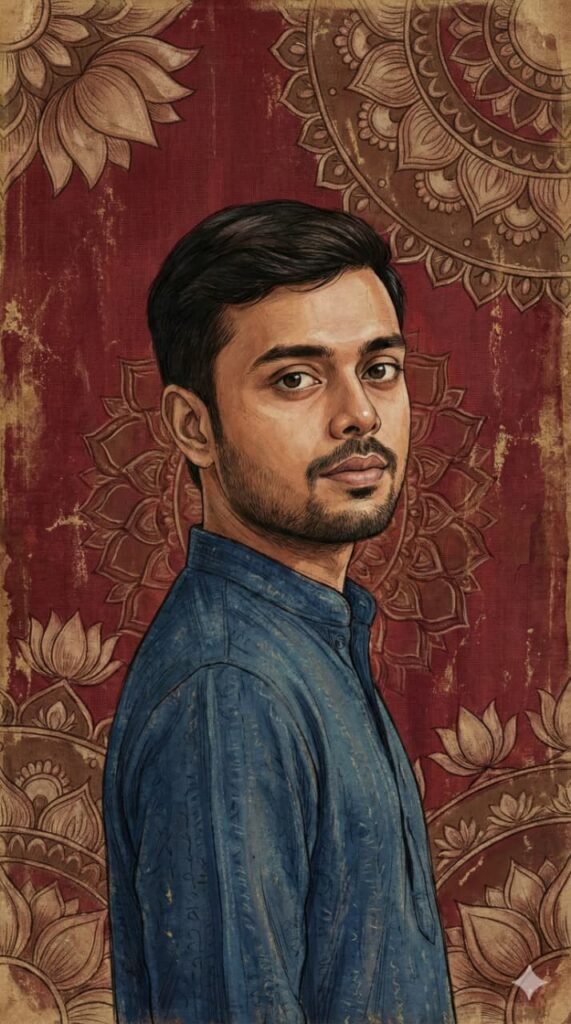
Vertical artistic portrait using the uploaded image as a hard identity lock. Preserve exact face: same facial structure, skin tone, eye shape, eyebrows, nose, lips, hairline, hair texture,beard/stubble if present. No beautification. No face change. Vertical frame 9:16. Medium close-up close-up. Subject turned slightly sideways, head gently rotated back toward the camera, over-the-shoulder feel. Eyes looking directly at the viewer with a calm, composed gaze. Expression neutral to soft. Natural masculine posture. Foreground subject sharply defined. Skin rendered in a painterly illustrated style, not photorealistic. Visible brush strokes, fine linework, soft texture. Maintain realistic facial planes adapted to a male face. Hair unchanged from the uploaded image, softly textured, natural fall. Clothing simple and traditional-toned, blending with the artwork (no modern logos). Background: deep maroon and crimson red, textile-inspired surface with intricate hand-drawn mandala and lotus motifs, Indian miniature / folk mural style. Aged parchment texture,

distressed paint, subtle grain and wear.

Color palette: deep reds, maroons, warm browns, muted beige highlights, soft gold undertones. Lighting: soft ambient, evenly diffused, gentle shadows, matte finish. No harsh contrast. No glow. Art style: Indian classical art fusion, folk art texture, vintage mural aesthetic, digital painting. Ultra-high resolution, vertical wallpaper format, cinematic composition. No text. No watermark. Clean edges. Negative constraints: no photorealism, no HDR, no plastic skin, no symmetry correction, no pose exaggeration, no added jewelry, no modern props, no background blur, no typography.Frequently Asked Questions
1. What are viral artistic portrait photo editing prompts and why are they trending online?
Viral artistic portrait photo editing prompts are AI-based text instructions used to transform normal photos into artistic, cinematic, or realistic portraits. They are trending because modern AI tools can create professional-quality edits instantly, making them popular on Instagram, Pinterest, and other social platforms.
2. How can artistic portrait photo editing prompts help create viral images on social media?
These prompts enhance lighting, color grading, facial features, and overall mood. Eye-catching artistic portraits attract more attention, resulting in higher engagement, shares, and followers on social media.
3. Which AI tools are best for using viral artistic portrait photo editing prompts?
Popular AI tools include Google Gemini, Midjourney, Leonardo AI, Adobe Firefly, and Photoshop AI. These platforms support advanced portrait editing and artistic enhancements.
4. How do I write high-quality artistic portrait prompts for realistic and cinematic results?
A high-quality prompt should mention lighting style, camera angle, facial details, color tone, background mood, and realism level. Keywords like “cinematic lighting” and “ultra-realistic portrait” help achieve better results.
5. Can viral portrait photo editing prompts be used for Instagram, Reels, and YouTube thumbnails?
Yes, these prompts are ideal for Instagram posts, Reels, Shorts, and YouTube thumbnails because they create visually striking portraits that stand out in feeds.
6. What keywords should be included in artistic portrait photo editing prompts for better SEO?
SEO-friendly keywords include viral portrait editing, AI photo editing prompts, artistic portrait prompt, cinematic portrait AI, and realistic photo enhancement.
7. How can beginners use viral artistic portrait prompts to enhance their photos easily?
Beginners can copy ready-made prompts, upload their photos to an AI tool, and apply the prompt directly. No advanced editing skills are required to get professional-looking results.
8. Are AI-generated artistic portrait photo editing prompts safe to use for commercial projects?
Most AI platforms allow commercial usage, but users should always review the tool’s licensing terms. Using original photos and custom prompts is recommended for safe commercial use.
9. What are the common mistakes to avoid when using viral portrait photo editing prompts?
Common mistakes include using vague prompts, over-smoothing skin, ignoring lighting balance, and mismatching the prompt with the image type. Clear and specific prompts deliver better results.
10. How do viral artistic portrait photo editing prompts increase website traffic and user engagement?
These prompts target trending AI-related searches. Adding FAQs, examples, and tutorials improves SEO, increases user engagement, and encourages visitors to spend more time on the website.