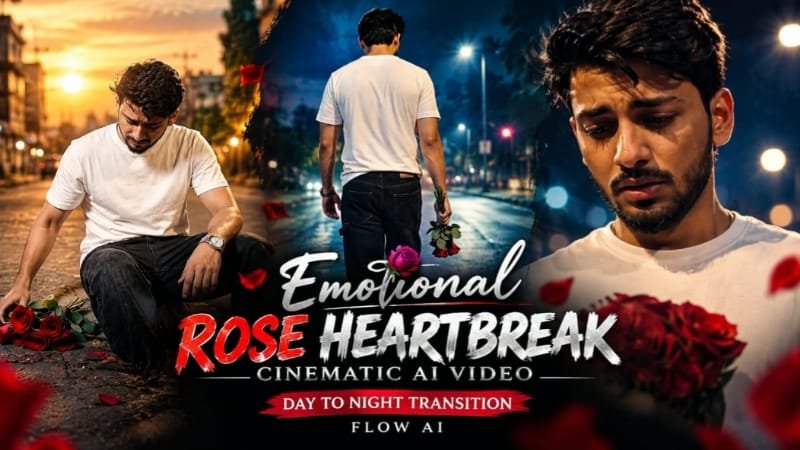
Have you seen those Instagram reels where a single red rose sits in golden daylight, and then the whole scene slowly melts into a lonely, moody night? That is the Emotional Rose Heartbreak cinematic AI video trend, and it is blowing up right now for one simple reason: it makes people feel something in just 8 seconds. In this article, I will show you exactly how to create this day to night transition video using ChatGPT for the image and Google Flow for the video, with the complete step-by-step process.
Emotional Rose Heartbreak AI Video Kya Hai?
Ye ek cinematic AI video trend hai jisme ek rose (ya rose ke saath ek sad character) ko pehle din ki warm light me dikhaya jata hai.
Phir camera dheere dheere move karta hai aur scene day se night me transform ho jata hai.
Roshni kam hoti hai, sky dark blue ho jata hai, aur rose ki petals girna shuru ho jati hain.
Background me sad piano music lagate hain aur poori video heartbreak wali feeling deti hai.
Log ise breakup reels, sad status videos aur emotional love story edits me use kar rahe hain.
Sabse badi baat ye hai ki isme kisi editing skill ki zarurat nahi hai.
Bas ek accha image prompt, ek video prompt aur Google Flow chahiye.
A cinematic ultra-realistic 4K/8K video (16:9) of a young man wearing a plain white t-shirt, black baggy denim jeans, red Nike slide sandals, and a silver wristwatch, starting on a sunlit street near a petrol station with parked auto-rickshaws and a small roadside market, then transitioning into night as the emotional mood deepens, rich full vibrant cinematic color grading built directly into the footage — realistic natural colors, warm daylight tones shifting into moody blue-amber night tones, cinematic contrast, never faded, never black and white, never desaturated. A small, subtle watermark reading 'NoorEditing07' stays fixed in the bottom corner throughout the entire video, minimal white or light-colored font, low opacity, appearing only once at all times.

CRITICAL: use the uploaded reference photo as the exact identity source — same face, same exact facial features, same clean, clear, completely natural realistic skin with no artificial smoothing or plastic look, and the exact same body type and build as shown in the uploaded photo, maintained precisely and identically in every single scene with zero facial drift or identity change. This must work accurately for any person of any age or body type who uploads their own reference photo — the generated face, skin, and body must always match the uploaded photo exactly, never a generic or different look.

Scene 1 (0-3 seconds): Low close-up shot — his face not visible, only his hands and wristwatch in frame — he picks up scattered red roses one by one from the cracked pavement, each rose picked up individually and gathered into the growing bunch in his other hand, this one-by-one picking motion continues for exactly the first 3 seconds until all the roses have been collected into one complete bunch, warm daylight, petrol station and roadside shops softly blurred in the background.

Scene 2 (Transition — Day to Night): He slowly rises and stands up straight with the now-complete bunch of roses held in his hand — his face becomes visible for the first time in this scene as he straightens up. Exactly at the moment he becomes fully upright, the daylight instantly transforms into night — the warm sunlit street shifts into a dim, amber-lit empty night street, deep blue night sky replacing the bright sky, streetlight glowing above him, head lowered in quiet sorrow, camera held still at eye level.

Scene 3 (Night, slow close-up push-in): Camera slowly pushes in on his face as he looks down at the roses in his hands, eyes heavy with sadness, soft streetlight casting shadows across his face, a lonely emotional stillness in the night air.

Scene 4 (Night, wide tracking shot from behind): Camera follows slowly from behind as he walks heavily along the empty night street, shoulders slumped, roses held loosely in one hand, distant shop shutters closed and streetlights glowing along the road.

Scene 5 (Night, low-angle close shot): Camera positioned low looking slightly upward as he stops and presses the roses gently to his chest with both hands, eyes closing as if holding onto a painful memory, warm streetlight glow illuminating his face against the dark night.

Scene 6 (Night, high-angle slow zoom-out): Camera looks down from a slightly elevated angle as he sits slowly on the edge of the pavement, roses resting beside him, head bowed in quiet grief, the dim streetlight above casting a soft glow over the empty night street, cinematic slow zoom-out to a somber emotional finish.

Overall style: same face, same identity, same clean natural skin, same exact body type as the uploaded reference photo, same white t-shirt, black baggy jeans, red Nike slides, and silver wristwatch outfit consistent in every single scene, no outfit change, no identity or body change, same real street location throughout transitioning naturally from day to night exactly as he stands up in Scene 2, natural realistic movement with deeply emotional sad poses and genuinely distinct camera angles in every scene, realistic skin and fabric texture, rich full cinematic color grading shifting from warm daylight to moody amber-blue night tones baked directly into the footage — full natural color throughout, no additional grading needed, never faded or desaturated — filmic depth and contrast, evocative melancholic mood, smooth cinematic transitions between poses, ultra-realistic premium 4K/8K quality, 16:9 widescreen format, continuous emotional heartbreak story flow from start to end, no scene skipped, only 6 scenes total exactly as described.

Watermark (final instruction): keep a single small, subtle, clean text watermark reading 'NoorEditing07' fixed in the same bottom corner position throughout the entire video, minimal white or light-colored font, low opacity, non-intrusive, appearing only once on screen at any given time.Ye Trend Viral Kyu Ho Raha Hai?
- Day to night transition khud me hi ek emotional story bata deta hai (khushi se udaasi tak).
- Rose ka symbol pyaar aur dard dono ko ek saath dikhata hai.
- Video sirf 5 se 8 second ki hoti hai, isliye reels me loop hoti hai aur logon ko baar baar dekhne ka mann karta hai.
- Sad songs aur shayari ke saath ye bahut hi zyada relatable lagti hai.
- Ye sirf phone se ban jati hai, koi heavy software nahi chahiye.
Tools Jo Aapko Chahiye Honge
| Tool | Kaam | Is Trend Ke Liye Kaisa Hai |
|---|---|---|
| ChatGPT | Starting image banana | Best, rose aur lighting details bahut accurate deta hai |
| Google Flow | Image ko video me animate karna | Best, day to night transition sabse smooth banata hai |
| Google Gemini | Image ya video prompt likhna | Accha hai, Flow ke saath easily connect ho jata hai |
| CapCut | Music, text aur final editing | Best final touch ke liye |
| VN | Video edit aur color grading | Free aur beginner friendly |
| Midjourney | High quality rose image | Bahut sundar images, lekin paid hai |
| Leonardo AI | Rose image generation | Free credits milte hain, cinematic style accha hai |
Mera suggestion simple hai: image ChatGPT se banao, video Google Flow se banao, aur music CapCut me daalo.
Step 1: ChatGPT Se Rose Ki Starting Image Banao
Sabse pehle hume din wali (daytime) image chahiye.
Ye wahi frame hoga jisse Flow video start karega.
Isliye image me warm golden light, clean background aur ek beautiful red rose hona chahiye.
Neeche wale code block me apna image prompt paste karo:
Image generate hone ke baad ye cheezein check karo:
- Rose bilkul center me ya thoda side me clearly dikh raha ho.
- Light warm aur golden ho, kyunki isi se night me transition sundar lagta hai.
- Background me sky ya open space ho taaki sky ka color change dikh sake.
- Image vertical (9:16) me ho, reels ke liye.
Step 2: Google Flow Me Image Upload Karo
Ab Google Flow open karo.
New project banao aur “Frames to Video” ya “Image to Video” option select karo.
Apni ChatGPT wali image starting frame me upload kar do.
Aspect ratio 9:16 rakhna, warna reel me black bars aa jayenge.
Step 3: Day To Night Transition Wala Video Prompt Paste Karo
Ab asli magic yahin hota hai.
Video prompt me clearly likhna zaruri hai ki camera kaise move karega, light kaise change hogi aur petals ka kya hoga.
Apna Flow video prompt yaha paste karo:
[Paste your Google Flow video prompt here]Prompt me ye cheezein zarur hone chahiye:
- Slow cinematic camera movement (slow push in ya slow pull back)
- Golden daylight se dark blue night me smooth transition
- Petals ka dheere dheere girna
- Sky me stars ka aana ya moon ka dikhna
- Sad, moody, emotional atmosphere
Step 4: Video Generate Karo Aur Best Version Chuno
Generate button dabao aur thoda wait karo.
Ek hi baar me perfect video kabhi kabhi nahi milti, isliye 2 se 3 versions generate karo.
Jo version me transition sabse smooth ho aur rose distort na ho, wahi choose karo.
Step 5: CapCut Me Music Aur Text Add Karo
Video download karke CapCut me import karo.
Ab isme ye sab add karo:
- Sad piano ya slow instrumental music
- Ek chhoti si heartbreak shayari ya line text ke roop me
- Halka sa film grain ya vignette effect
- Fade in aur fade out taaki video loop feel de
Music ko video ke transition point pe sync karoge to result bahut zyada emotional lagega.
Jab din raat me badle, tab music ka beat ya tone bhi change hona chahiye.
Pro Tips Jo Result Ko Next Level Bana Denge
- Starting image me hamesha golden hour wali warm light rakho, isse night transition zyada dramatic lagta hai.
- Prompt me sirf ek main subject rakho (sirf rose), zyada cheezein daaloge to AI confuse ho jata hai.
- Petals girne ka mention zarur karo, ye heartbreak feel ka sabse strong element hai.
- Video ko 8 second se zyada mat khinchao, short videos zyada loop hoti hain.
- Instagram pe post karte waqt sad hashtags aur trending sad audio use karo.
- Agar rose distort ho jaye to same prompt me “rose shape stays perfectly consistent” add karke dobara try karo.
- Video ko pehle 2 second me hi hook banao, warna viewers scroll kar dete hain.
Common Mistakes Jo Avoid Karni Hain
- Image me pehle se hi dark lighting rakhna, isse day to night ka effect dikhega hi nahi.
- Bahut zyada complicated background lena.
- Ek hi prompt me bahut saare camera movements daal dena.
- Horizontal image use karna aur phir reel me crop karna.
- Music ko transition ke saath sync na karna.
Emotional Rose Heartbreak AI Video: FAQs
Emotional rose heartbreak AI video kaise banate hain?
Pehle ChatGPT se ek daytime rose image banao, phir use Google Flow me upload karke day to night transition wala video prompt do.
Uske baad CapCut me sad music aur shayari add karke reel ready kar lo.
Rose day to night transition video ke liye Google Flow best kyu hai?
Google Flow image ko starting frame maan kar lighting change ko bahut smooth tareeke se animate karta hai.
Isse rose ka shape bhi zyada consistent rehta hai jab light din se raat me badalti hai.
Kya heartbreak rose video me petals girna zaruri hai?
Zaruri nahi hai, lekin petals ka dheere dheere girna is trend ka sabse emotional part hai.
Ye “kuch toot raha hai” wali feeling deta hai, isliye prompt me isko zarur add karo.
Is video ke liye kaunsa background music sabse accha rahega?
Slow piano ya soft instrumental sad music sabse best kaam karta hai.
Music ko transition wale moment pe sync karo taaki din se raat ka change aur strong lage.
Rose ki image day wali hi kyu leni chahiye, night wali kyu nahi?
Kyunki video ki story day se night ki taraf jaati hai, isliye starting frame warm daylight me hona chahiye.
Agar image pehle se dark hogi to transition ka effect nazar hi nahi aayega.
Kya main is trend me apni shayari ya text add kar sakta hu?
Bilkul, CapCut ya VN me heartbreak shayari ya ek chhoti si sad line add karne se video aur personal aur emotional lagti hai.
Text ko simple font me rakho aur video ke end me fade in karo.
Reel ke liye is video ka best length kitna hona chahiye?
5 se 8 second best rehta hai.
Itni chhoti video loop hoti hai aur viewers ko baar baar dekhne ka mann karta hai.
Final Words
To ye tha Emotional Rose Heartbreak cinematic AI video ka poora process.
ChatGPT se image, Google Flow se day to night video aur CapCut se music, bas itna hi lagta hai.
Prompts apne hisaab se try karo, 2 se 3 versions generate karo aur best wala post karo.
Aisi hi trending AI photo aur video prompts ke liye meraprompt.com ko roz visit karte raho.
Aur sabse fast updates chahiye to hamara Telegram channel abhi join karo, wahan naye prompts sabse pehle daalte hain.