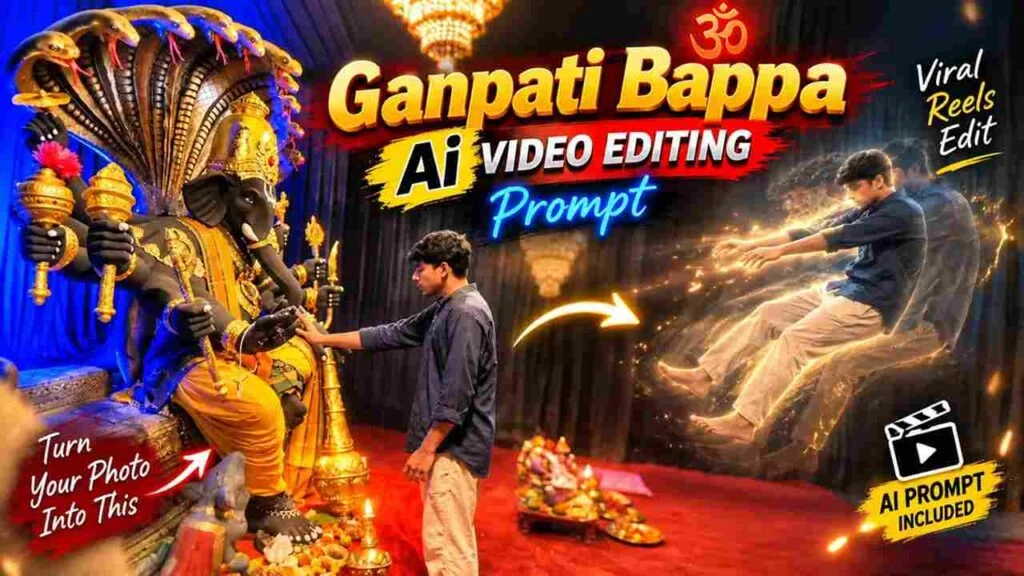
Create an emotional Ganpati Visarjan AI video using just one photo and AI. This trending prompt turns a simple Bappa image into a cinematic farewell video with dhol-tasha energy, floating flowers, and a devotional “Ganpati Bappa Morya” mood — perfect for Instagram Reels and YouTube Shorts during visarjan season.
🙏 Ganpati Visarjan AI Video Kya Hai
Visarjan wala moment sabse emotional hota hai poore Ganesh Chaturthi mein.
Is AI video trend mein aap apni Bappa idol ya reference photo ko ek moving, cinematic visarjan scene mein convert kar sakte ho.
AI tool aapki photo ko samajh kar usme dhol-tasha crowd, floating marigold petals, water ripples aur emotional camera movement add kar deta hai.
Result ek short cinematic clip hota hai jo bilkul real visarjan jaisa lagta hai, bina kisi heavy video editing skill ke.
Ye prompt especially un logo ke liye best hai jo apni ghar ki Bappa murti ka ek yaadgar farewell video banana chahte hain.
🎬 Trending Ganpati Visarjan AI Video Prompt
Apni Ganpati Bappa reference photo ke saath ye prompt use karo.
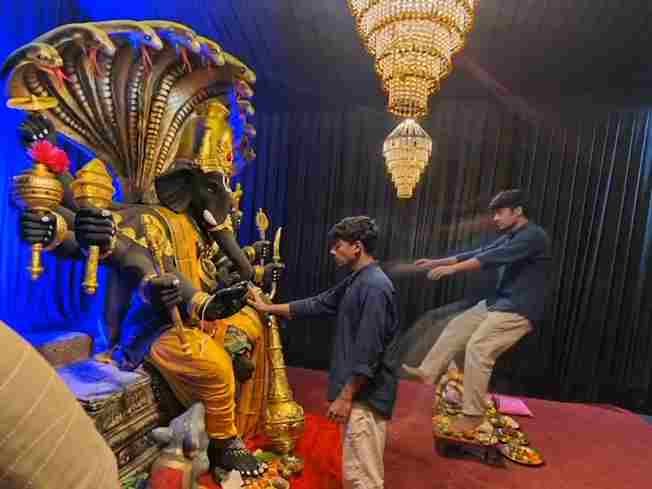
Create a near-square devotional VFX fantasy video inside a richly decorated Ganesh pandal hall. A young barefoot devotee with curly dark hair, light stubble, a dark navy button-up kurta-shirt, and beige trousers stands before a colossal graphite-black Ganesha murti seated in lalitasana on a carved throne. Ganesha wears a golden jeweled crown, white tusks, a left-curving trunk, multiple arms holding a mace, trident, sword, fly-whisk, and blessing hand, a mustard-yellow dhoti with green sash, and detailed gold jewelry. A seven-hooded cobra canopy fans behind the idol with visible red tongues, with a grey mushika at the feet and red cloth at the base. The hall has electric-blue glowing drapes, black curtain walls, crystal chandeliers, a red carpet, and an offering table with fruit plates, brass lamps, a small Ganesha idol, and a pink cloth/book.

Camera direction: Start with only a brief small front-facing camera shot showing the devotee approaching and looking up at Bappa. Then transition into the entire main sequence from the RIGHT SIDE of Bappa, maintaining a cinematic side perspective. In the right-side view, frame the devotee through the foreground silhouette of Bappa’s black head/tusk and a golden kalasha topped with a huge magenta flower. The devotee slowly extends his arm toward the deity with awe and solemn focus. Cut to an extreme macro close-up of his fingertip touching Bappa’s black finger with a gold-tipped nail, creating a dramatic Creation-of-Adam-style contact with blue-gold bokeh.

Immediately at the touch, keep the devotee’s real body physically anchored with his hand resting on Bappa’s forearm, while a translucent, motion-blurred duplicate of the same devotee emerges from him and is pushed/levitated backward and upward across the hall toward the right side of the frame, arms outstretched, drifting farther away frame by frame. The ghost duplicate passes visually beyond the offering table and continues toward the edge of the frame. Keep the camera locked in the right-side wide perspective during the VFX payoff so the supernatural movement feels clear and realistic. End mid-float.

Highly realistic cinematic VFX, devotional atmosphere, stage-lit saturation, blue-versus-gold contrast, warm chandelier glints, realistic fabric and skin textures, volumetric light, subtle incense haze, physically accurate shadows, natural motion blur, detailed jewelry, cobra tongues, mushika, fruit thali, brass lamps, bare feet on red carpet. No dialogue, no lip-sync, no text, no subtitles. Temple bells and deep devotional score implied. Preserve the exact identity and appearance of the devotee throughout; no face distortion, no extra people, no unnecessary background changes.Is prompt ko copy karke seedha apne AI video tool ke prompt box mein paste kar dena.
📝 Ganpati Visarjan AI Video Kaise Banaye
- Apna AI video tool open karo aur account login karo.
- Ek clear Ganpati Bappa reference photo upload karo.
- Upar diya gaya visarjan prompt copy karo.
- Prompt ko tool ke input box mein paste karo.
- Generate button dabao aur video process hone do.
- Generated video ko preview karke check karo.
- Final video download karke apne caption ke saath post kar do.
📸 Sahi Reference Photo Kaise Choose Kare
Video ka result kaafi hadd tak reference photo par depend karta hai.
Hamesha ek clear, well-lit photo choose karo jisme Bappa idol ka face aur decoration achhe se visible ho.
Agar photo mein pandal, flowers ya lights already hain, to wo bhi prompt mein mention kar sakte ho for better consistency.
Blurry ya dark photo se AI ko details samajhne mein problem hoti hai, isliye acchi quality image hi use karo.
✨ Emotional Visarjan Mood Kaise Set Kare
Visarjan video ka sabse important part hota hai uska emotional feel.
Slow camera movement, soft golden light aur halka background blur se scene zyada real aur touching lagta hai.
Water ripples, floating petals aur halki dhol-tasha vibe add karne se video mein energy bhi aa jaati hai bina overdo kiye.
Zyada complicated movement na dalo, simple aur natural motion hi sabse best result deta hai.
🎉 Crowd aur Festive Elements Add Kare
Real visarjan mein hamesha ek josh bhara crowd hota hai, aur ye feel apne AI video mein bhi la sakte ho.
Dhol-tasha players, hath uthaye hue log, gulaal ka halka effect aur “Ganpati Bappa Morya” ka festive mahaul mention karo prompt mein.
In sabko subtle rakho taki main focus hamesha Bappa ki murti par hi rahe, background sirf support kare.
💡 Better Result Ke Liye Pro Tips
Hamesha idol ka face, crown aur original design preserve karne ki clear instruction do.
Ek baar mein bahut saari changes mat maango, ek time par ek hi movement add karo.
Agar AI idol ka structure change kar de, to prompt simplify karke dobara try karo.
Multiple versions generate karke sabse natural lagne wala video select karo final post ke liye.
🛠️ AI Tools Comparison Table
| AI Tool | Best For | Video Quality | Ease of Use |
|---|---|---|---|
| ChatGPT | Reference image editing | Good | Very Easy |
| Google Gemini | Prompt refinement | Good | Easy |
| Google Flow | Cinematic video generation | Excellent | Medium |
| CapCut | Final editing + music | Excellent | Very Easy |
| VN | Mobile video editing | Very Good | Easy |
| Midjourney | Stylized static frames | Excellent | Medium |
| Leonardo AI | Alternate image styles | Very Good | Medium |
🎵 Editing Aur Music Se Finishing Touch
Video generate hone ke baad usme devotional ya dhol-tasha background music add karo apne favorite editing app mein.
Smooth transitions aur halka color correction se video aur bhi polished lagega.
Agar aapke paas multiple clips hain to unhe combine karke ek chhota visarjan montage bhi bana sakte ho.
Instagram Reels aur YouTube Shorts ke liye vertical format mein hi final export karo.
❓ Ganpati Visarjan AI Video FAQs
Q1. Kya main apni ghar ki Bappa murti ki photo use kar sakta hoon?
Haan, apni khud ki Ganpati murti ki clear photo is prompt ke liye best result deti hai.
Q2. Ye video kitne second ka banega?
Zyadatar AI video tools short clips generate karte hain, jo Reels aur Shorts ke liye perfect length hoti hai.
Q3. Kya AI generated visarjan video real dikhega?
Achhi reference photo aur sahi prompt use karne par video kaafi realistic aur emotional lagta hai.
Q4. Kya is prompt ko dusre devotional idols ke saath bhi use kar sakte hain?
Ye prompt specially Ganpati visarjan theme ke liye banaya gaya hai, best result isi context mein milta hai.
Q5. Agar generated video mein idol ka face change ho jaye to kya kare?
Prompt ko simplify karke “preserve original face and design” jaisi clear instruction dobara add karo.
📲 Aise hi trending AI photo aur video editing prompts ke liye humara Telegram channel join karo — MeraPrompt Telegram — sabse pehle naye prompts wahan milte hain!