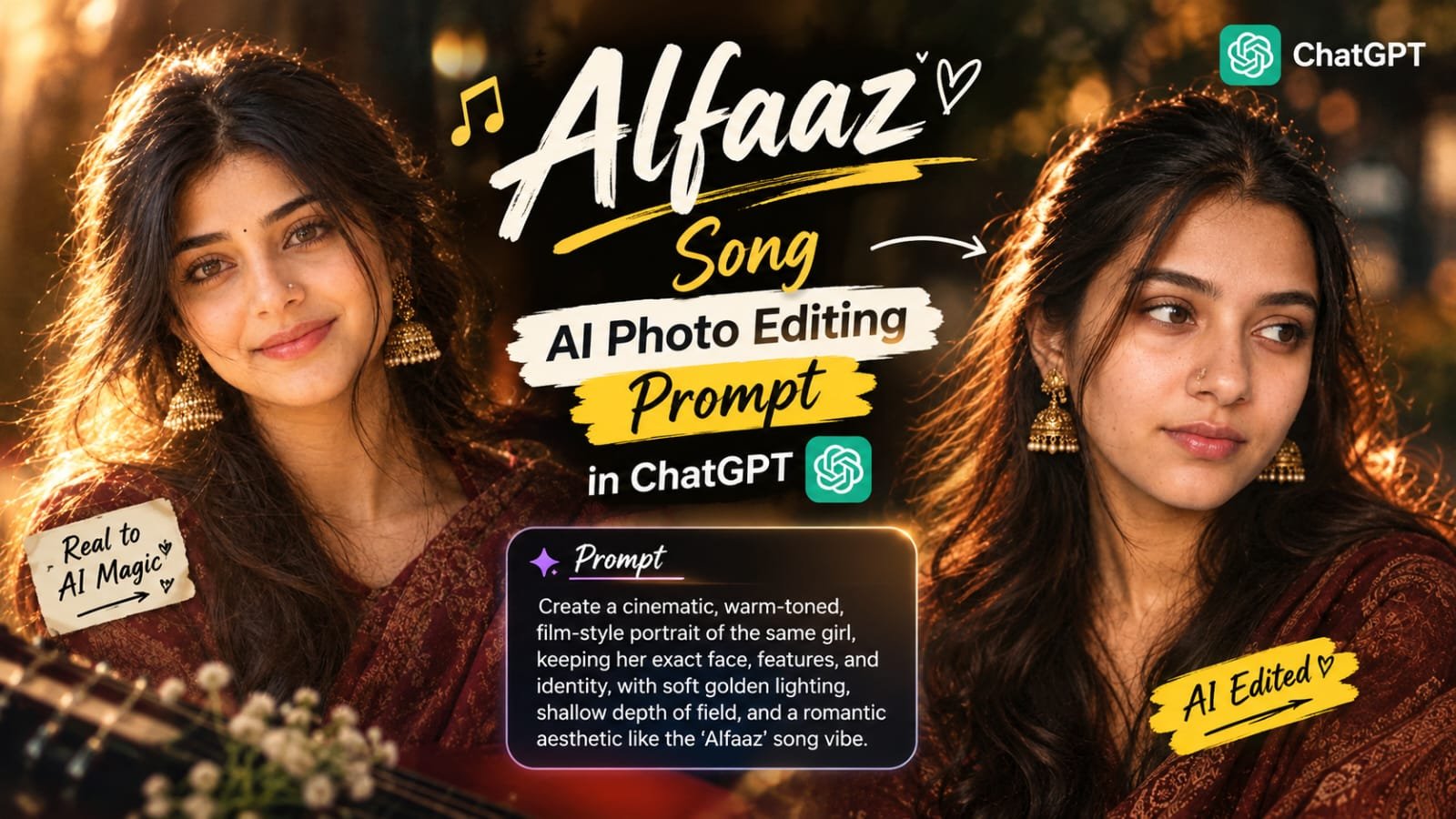
If you have been scrolling Instagram lately, you have probably heard the Alfaaz song playing on almost every second reel.
The soft, emotional vibe of the song has inspired a brand new AI photo trend, where people turn their normal pictures into dreamy, cinematic portraits.
In this article, I will share how to create the Alfaaz song AI photo in ChatGPT, step by step, with a ready-to-use prompt format.
Whether you are a beginner or already making AI photos daily, this guide is for you.
What Is the Alfaaz Song AI Photo Trend?
Alfaaz song Instagram par abhi bahut zyada trending hai.
Isi song ke emotional mood par log apni AI photos bana rahe hain.
Photo me ek soft, romantic aur cinematic feel hota hai.
Warm light, thoda dreamy background aur emotional expression is trend ki jaan hain.
Log is photo ko reel me lagakar song ke saath post kar rahe hain.
Isliye ye trend itni tezi se viral ho raha hai.
Why This Trend Is Going Viral
Song ka mood har kisi ko connect karta hai.
Photo banana bahut easy hai, bas ek selfie aur ek prompt chahiye.
Result dekhne me premium aur professional lagta hai.
Instagram reels me ye photo song ke saath perfect sync hoti hai.
Isliye creators aur normal users dono is trend ko try kar rahe hain.
What You Need Before Starting
- A clear photo of yourself (front-facing, good light)
- ChatGPT app or website (image generation enabled)
- The Alfaaz song prompt (given below)
- Instagram or CapCut for posting the final reel
Photo jitni clear hogi, result utna hi better aayega.
Blurry ya dark photo use mat karna.
Alfaaz Song AI Photo Prompt for ChatGPT
Neeche diye gaye code block me apna prompt paste karna hai.
Isme apni photo ke hisaab se details adjust kar sakte ho.
Prompt
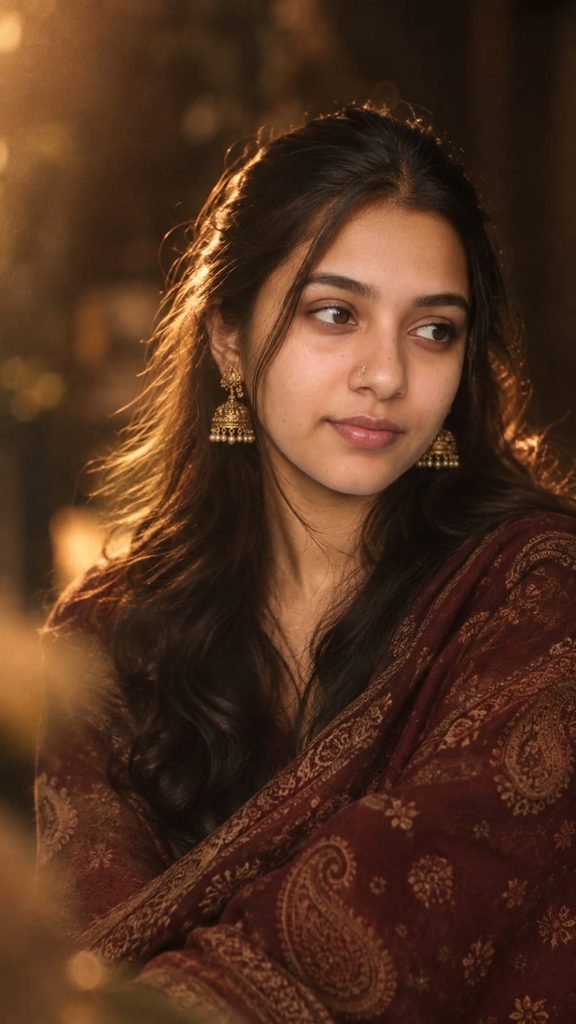
Image Generation Prompt

Use Image 1 as the complete visual reference and Image 2 as the face/identity reference.

Recreate the portrait from Image 1 as closely as possible, but replace the woman's identity with the person shown in Image 2. Do not copy the face from Image 1.

COMPOSITION & POSE
• Vertical portrait, ~9:16
• Same seated/upper-body composition and framing as Image 1
• Woman positioned slightly toward the center-right
• Head turned slightly to the side, eyes looking gently off-camera toward the left
• Calm, subtle, natural expression with a very soft hint of a smile
• Natural candid photography, not a posed headshot

OUTFIT
• Deep burgundy/maroon paisley-patterned shawl/dupatta
• Rich traditional Indian textile with muted antique-gold motifs
• Same draping style and coverage as Image 1

ACCESSORIES
• Small delicate traditional nose ring/nose ornament
• Ornate antique-gold jhumka earrings
• Placed and scaled like in Image 1

HAIR
• Long, dark, naturally voluminous hair
• Soft loose waves, middle/slightly off-center parting
• Hair falling naturally around shoulders
• A few loose strands around the face
• Backlit hair strands with golden rim light

LIGHTING
• Warm amber/golden cinematic lighting
• Soft backlight creating a halo around the hair
• Gentle warm illumination on the face
• Dark, moody background with reddish-brown ambience
• Soft highlights, natural falloff, rich shadows

BLUR / DREAMY EFFECT
• Very shallow depth of field
• Soft-focus portrait photography
• Gentle lens diffusion and dreamy haze
• Subtle foreground blur, creamy background bokeh
• Slight film grain, vintage photographic feel
• Keep face recognizable and naturally focused

COLOR GRADING
• Deep chocolate brown, warm amber, burnt red, burgundy
• Muted antique gold, warm skin tones
• Low-to-medium contrast, slightly desaturated vintage finish

SKIN & FACE
• Keep the person's real identity from Image 2
• Natural, warm skin with gentle blush
• Subtle glossy/rosy lips, soft defined eyes, natural brows
• Light cinematic retouching (no over-smoothing or reshaping)

PHOTOGRAPHY STYLE
• Feels like a real photograph, not AI
• Professional portrait look with wide aperture
• Warm practical lighting, shallow depth of field
• Cinematic, dreamy, slightly vintage mood

FINAL RESULT
Should look like the person from Image 2, photographed in the exact same cinematic environment and styling as Image 1.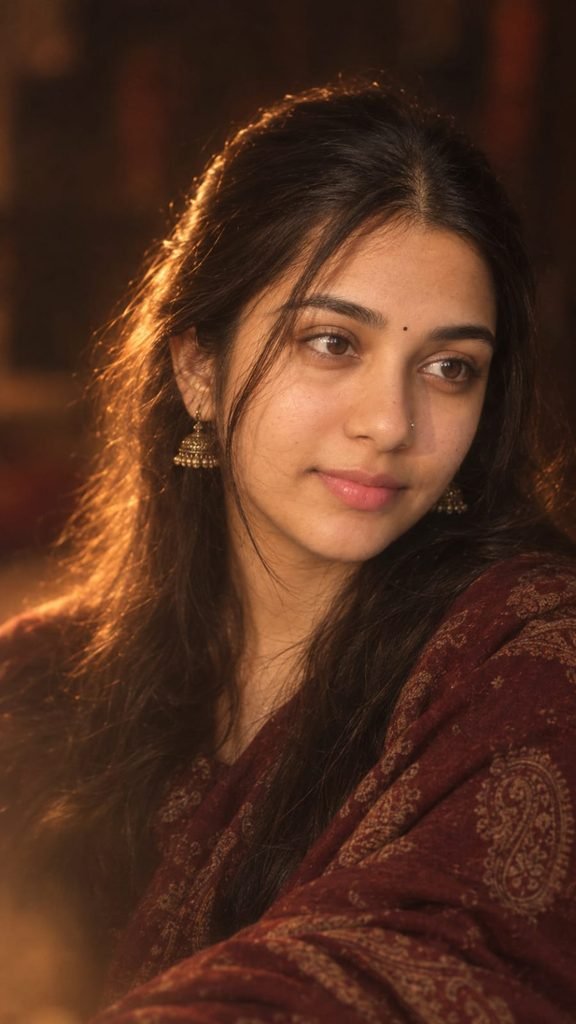
IMAGE EDIT / FACE REPLACEMENT PROMPT

Use Image 1 as the complete visual reference and Image 2 as the face/identity reference.

Recreate the portrait from Image 1 as closely as possible, but replace the woman's facial identity with the person shown in Image 2. Do not copy the face from Image 1. Use the facial features, face shape, eyes, nose, lips, skin tone and overall identity from Image 2.

Keep everything else inspired by Image 1:

COMPOSITION & POSE

Vertical portrait, approximately 9:16

Same seated/upper-body composition and framing as Image 1

Woman positioned slightly toward the center-right of the frame

Body posture relaxed and elegant

Head turned slightly toward the side

Eyes looking gently off-camera toward the left

Calm, subtle, natural expression with a very soft hint of a smile

Natural candid photography rather than a posed studio headshot

Preserve the approximate camera angle, crop, perspective and subject-to-frame proportions of Image

1

OUTFIT

Recreate the deep burgundy/maroon paisley-patterned shawl/dupatta

Rich traditional Indian textile appearance

Intricate muted antique-gold paisley motifs

Same draping style and coverage across the shoulders and upper body

Do not introduce a different outfit, blouse, color or pattern

ACCESSORIES

Small delicate traditional nose ring/nose ornament similar to Image 1

Ornate antique-gold jhumka earrings

Keep the accessories subtle, elegant and realistic

Accessories should follow the placement and scale visible in Image 1

HAIR

Long, dark, naturally voluminous hair

Soft loose waves

Middle/slightly off-center parting

Hair falling naturally around the shoulders

A few loose strands around the face

Preserve the beautiful backlit hair strands visible in Image 1

Hair should look naturally photographed, not artificially perfect

LIGHTING Recreate the distinctive lighting of Image 1:

Warm amber/golden cinematic lighting

Strong but soft golden rim light/backlight around the hair

Gentle warm illumination across the face

Dark, moody background

Subtle reddish-brown ambient light in the background

Soft highlights rather than harsh white lighting

Natural falloff from the illuminated face into the darker surroundings

Preserve the glowing halo around individual strands of hair

BLUR / DREAMY EFFECT - VERY IMPORTANT The defining visual style should be the soft aesthetic blurry cinematic effect seen in Image 1.

Create:

Very shallow depth of field

Soft-focus portrait photography

Gentle lens diffusion

Dreamy atmospheric haze

Slight foreground blur

Creamy background bokehSubtle bloom around highlights

Soft edges without making the face unrecognizable

Delicate film grain

Slight natural motion/optical softness

Warm glowing highlights

A subtle vintage photographic feel

Do NOT make the entire image heavily blurred. The eyes, facial features and important details should remain recognizable and naturally focused, while the edges, background and foreground have the

dreamy diffusion seen in Image 1.

COLOR GRADING Match Image 1's color palette:

Deep chocolate brown

Warm amber

Burnt red

Burgundy/maroon

Muted antique gold

Warm skin tones

Low-to-medium contrast

Slightly desaturated vintage finish

Rich shadows without crushing all detail

BACKGROUND

Dark, indistinct indoor background

Brown/black environment

Soft reddish ambient patches

No recognizable objects

No text

No decorations

No modern studio equipment

Background should remain heavily out of focus

SKIN & FACE Use Image 2 to preserve the person's real facial identity. Keep their recognizable facial

proportions and features intact.

Apply only natural photographic treatment:

Soft warm skin

Natural texture

Gentle blush

Subtle glossy/rosy lips

Softly defined eyes

Natural brows

Very light cinematic retouching

Do not excessively smooth, reshape, slim, enlarge or alter the face.

PHOTOGRAPHY STYLE Make it look like a real photograph captured with a professional portrait camera and a fast lens, with a wide aperture, shallow depth of field, warm practical lighting and subtle diffusion/filtering.

The final result should feel like a real candid cinematic photograph, not an Al illustration or digital painting.

IDENTITY PRIORITY Image 2 = ONLY the person's facial identity/reference.

Image 1 = pose + composition + outfit + accessories + hair styling + lighting + background + color grading + blur effect + photographic mood.

Do not merge the two faces. Do not retain the facial identity of Image 1. Keep the person's identity from Image 2 while reproducing the visual aesthetic of Image 1.

FINAL REQUIREMENT: The finished image should look as though the person from Image 2 was actually photographed in the exact same cinematic environment and styling as Image 1, with the same warm dreamy soft-focus effect, rather than looking like a face pasted onto another photograph.

For the person using the prompt

Give the Al two images in this order:

Image 1: Your reference portrait - the maroon shawl, warm lighting, blur, pose, etc. Image 2: Your clear face photo - preferably front-facing, well-lit and without filters.

Then paste the prompt above.

Important: If the Al supports image instructions, tell it explicitly: "Image 1 is the STYLE/REFERENCE image. Image 2 is the IDENTITY/FACE reference." This prevents it from accidentally copying the reference person's face while trying to reproduce the styling.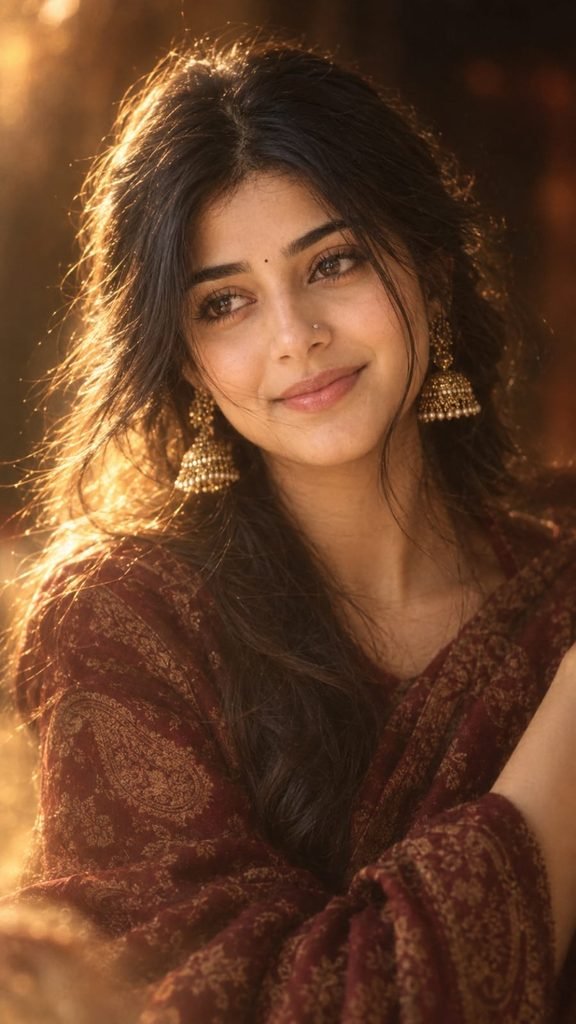
IMAGE EDIT / FACE REPLACEMENT PROMPT

Use Image 1 as the complete visual reference and Image 2 as the face/identity reference.

Recreate the portrait from Image 1 as closely as possible, but replace the woman's facial identity with the person shown in Image 2. Do not copy the face from Image 1. Use the facial features, face shape, eyes, nose, lips, skin tone and overall identity from Image 2.

Keep everything else inspired by Image 1:

COMPOSITION & POSE

Vertical portrait, approximately 9:16

Same seated/upper-body composition and framing as Image 1

Woman positioned slightly toward the center-right of the frame

Body posture relaxed and elegant

Head turned slightly toward the side

Eyes looking gently off-camera toward the left

Calm, subtle, natural expression with a very soft hint of a smile

Natural candid photography rather than a posed studio headshot

Preserve the approximate camera angle, crop, perspective and subject-to-frame proportions of Image

1

OUTFIT

Recreate the deep burgundy/maroon paisley-patterned shawl/dupatta

Rich traditional Indian textile appearance

Intricate muted antique-gold paisley motifs

Same draping style and coverage across the shoulders and upper body

Do not introduce a different outfit, blouse, color or pattern

ACCESSORIES

Small delicate traditional nose ring/nose ornament similar to Image 1

Ornate antique-gold jhumka earrings

Keep the accessories subtle, elegant and realistic

Accessories should follow the placement and scale visible in Image 1

HAIR

Long, dark, naturally voluminous hair

Soft loose waves

Middle/slightly off-center parting

Hair falling naturally around the shoulders

A few loose strands around the face

Preserve the beautiful backlit hair strands visible in Image 1

Hair should look naturally photographed, not artificially perfect

LIGHTING Recreate the distinctive lighting of Image 1:

Warm amber/golden cinematic lighting

Strong but soft golden rim light/backlight around the hair

Gentle warm illumination across the face

Dark, moody background

Subtle reddish-brown ambient light in the background

Soft highlights rather than harsh white lighting

Natural falloff from the illuminated face into the darker surroundings

Preserve the glowing halo around individual strands of hair

BLUR / DREAMY EFFECT - VERY IMPORTANT The defining visual style should be the soft aesthetic blurry cinematic effect seen in Image 1.

Create:

Very shallow depth of field

Soft-focus portrait photography

Gentle lens diffusion

Dreamy atmospheric haze

Slight foreground blur

Creamy background bokehSubtle bloom around highlights

Soft edges without making the face unrecognizable

Delicate film grain

Slight natural motion/optical softness

Warm glowing highlights

A subtle vintage photographic feel

Do NOT make the entire image heavily blurred. The eyes, facial features and important details should remain recognizable and naturally focused, while the edges, background and foreground have the

dreamy diffusion seen in Image 1.

COLOR GRADING Match Image 1's color palette:

Deep chocolate brown

Warm amber

Burnt red

Burgundy/maroon

Muted antique gold

Warm skin tones

Low-to-medium contrast

Slightly desaturated vintage finish

Rich shadows without crushing all detail

BACKGROUND

Dark, indistinct indoor background

Brown/black environment

Soft reddish ambient patches

No recognizable objects

No text

No decorations

No modern studio equipment

Background should remain heavily out of focus

SKIN & FACE Use Image 2 to preserve the person's real facial identity. Keep their recognizable facial

proportions and features intact.

Apply only natural photographic treatment:

Soft warm skin

Natural texture

Gentle blush

Subtle glossy/rosy lips

Softly defined eyes

Natural brows

Very light cinematic retouching

Do not excessively smooth, reshape, slim, enlarge or alter the face.

PHOTOGRAPHY STYLE Make it look like a real photograph captured with a professional portrait camera and a fast lens, with a wide aperture, shallow depth of field, warm practical lighting and subtle diffusion/filtering.

The final result should feel like a real candid cinematic photograph, not an Al illustration or digital painting.

IDENTITY PRIORITY Image 2 = ONLY the person's facial identity/reference.

Image 1 = pose + composition + outfit + accessories + hair styling + lighting + background + color grading + blur effect + photographic mood.

Do not merge the two faces. Do not retain the facial identity of Image 1. Keep the person's identity from Image 2 while reproducing the visual aesthetic of Image 1.

FINAL REQUIREMENT: The finished image should look as though the person from Image 2 was actually photographed in the exact same cinematic environment and styling as Image 1, with the same warm dreamy soft-focus effect, rather than looking like a face pasted onto another photograph.

For the person using the prompt

Give the Al two images in this order:

Image 1: Your reference portrait - the maroon shawl, warm lighting, blur, pose, etc. Image 2: Your clear face photo - preferably front-facing, well-lit and without filters.

Then paste the prompt above.

Important: If the Al supports image instructions, tell it explicitly: "Image 1 is the STYLE/REFERENCE image. Image 2 is the IDENTITY/FACE reference." This prevents it from accidentally copying the reference person's face while trying to reproduce the styling.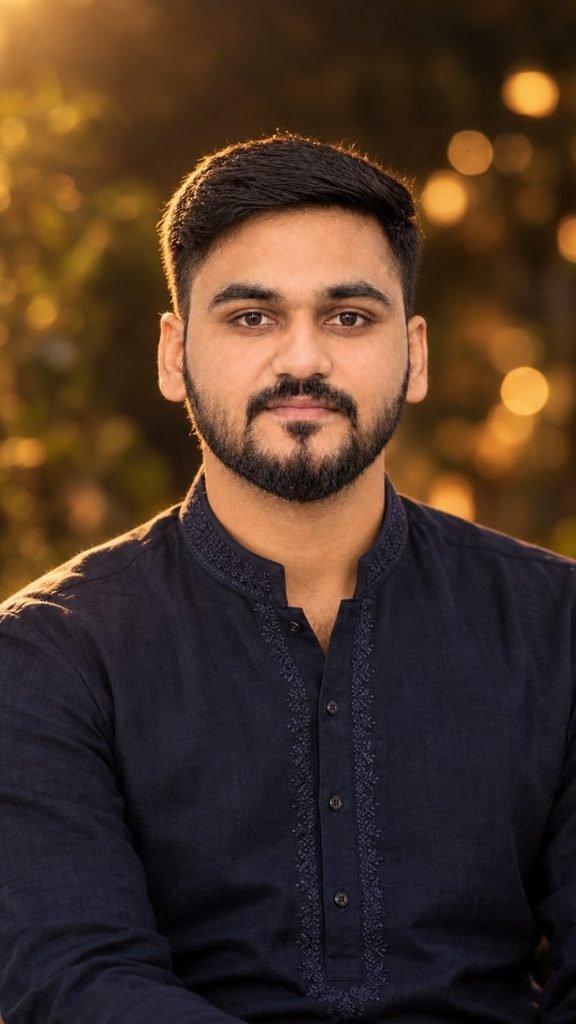
Create an ultra-realistic cinematic portrait by replacing the girl in the FIRST uploaded image with the boy from the SECOND uploaded image.

IMPORTANT REFERENCE RULE:
- FIRST IMAGE = exact reference for composition, framing, camera angle, pose, body placement, background, lighting, color grading, depth of field, bokeh, atmosphere, and overall photographic style.
- SECOND IMAGE = exact identity reference for the boy.
- Use the boy's face and identity exactly as shown in the SECOND image.
- Do NOT change, beautify, redesign, feminize, or reinterpret his face.

STRICT IDENTITY PRESERVATION:
Preserve the boy's exact facial identity and natural features from the SECOND image:
- same face shape
- same jawline
- same cheek structure
- same eyes and eye shape
- same eyebrows
- same nose
- same lips and mouth shape
- same skin tone and natural skin texture
- same hairline
- same hairstyle and hair texture
- same natural facial proportions
- same recognizable appearance

Do not make him look like a different person. Do not use an artificial handsome-face filter. Do not smooth or reshape his face. No face swap artifacts.

COMPOSITION:
Recreate the FIRST IMAGE as closely as possible, but replace the female subject with the boy.

Keep:
- the same vertical portrait composition
- same camera perspective
- same approximate head position and scale
- same chest-up framing
- same body placement
- same direction of gaze
- same relaxed facial expression
- same shallow depth of field
- same dark, softly blurred background
- same warm golden bokeh
- same cinematic atmosphere
- same lighting direction and intensity
- same warm amber/golden color grading
- same soft highlights around the hair and shoulders
- same realistic photographic depth

CLOTHING:
Replace the girl's clothing with an elegant dark navy-blue men's kurta.

The kurta should be:
- deep dark navy blue
- premium traditional Indian style
- subtle elegant embroidery around the collar and front placket
- realistic cotton/linen texture
- natural folds and fabric details
- sophisticated and masculine
- not overly shiny
- not overly decorative

The boy should look naturally dressed in the kurta, with realistic shoulders, neckline, sleeves, and fabric proportions.

LIGHTING:
Match the FIRST IMAGE's lighting exactly:
- warm golden-hour/late-evening illumination
- soft warm rim light from the upper-left/back side
- subtle golden highlights on the hair
- natural warm light across the face
- gentle shadows
- realistic skin highlights
- soft amber glow in the background
- cinematic but still photographic
- no artificial studio lighting

BACKGROUND:
Keep the background visually consistent with the FIRST IMAGE:
- dark, warm, softly blurred environment
- golden circular bokeh lights
- subtle out-of-focus foliage/background texture
- no new objects
- no people
- no distracting elements
- no major changes to the environment

PHOTOGRAPHIC STYLE:
Ultra-realistic real-camera photography.
Natural skin texture.
Realistic hair strands.
Realistic fabric texture.
Natural facial details.
Subtle lens characteristics.
Shallow depth of field.
Soft natural bokeh.
High dynamic range without excessive HDR.
Warm cinematic color grading while maintaining realistic skin tones.

The final image must look like a genuine photograph of the SAME BOY from the SECOND IMAGE photographed in the exact visual style and setting of the FIRST IMAGE.

MOST IMPORTANT:
Do not change the boy's face or identity.
Do not make him look like the original girl.
Do not create a generic male face.
Do not alter his facial structure.
Do not change his hairstyle.
Do not change his natural skin tone.
Only change the clothing, environment/composition integration, pose adaptation, and lighting so that he naturally fits into the FIRST IMAGE.

NEGATIVE PROMPT:
different face, altered identity, generic male face, face replacement artifacts, beautified face, smooth plastic skin, fairer skin, changed skin tone, different hairstyle, changed hairline, feminine face, facial reshaping, jaw alteration, nose alteration, eye alteration, lip alteration, unrealistic skin, CGI, 3D render, cartoon, illustration, anime, oversharpening, excessive HDR, excessive saturation, fake bokeh, artificial lighting, distorted anatomy, extra fingers, extra limbs, blurry face, duplicate person, watermark, text, logo.

OUTPUT:
Vertical 9:16 portrait, highly detailed, photorealistic, natural camera realism, matching the FIRST IMAGE as closely as possible while preserving the boy's exact identity from the SECOND IMAGE.
How to Create Alfaaz Song AI Photo in ChatGPT (Step by Step)
- ChatGPT app ya website open karo.
- Apni clear photo upload karo.
- Upar diya gaya prompt copy karke paste karo.
- Send button dabao aur image generate hone ka wait karo.
- Result pasand na aaye to prompt me thoda change karke dobara try karo.
- Final image ko download karo.
- Instagram ya CapCut me song ke saath reel bana lo.
Bas itna hi, sirf 2 se 3 minute ka kaam hai.
How to Make a Reel With the Alfaaz Song
Photo ban gayi, ab reel banane ka time hai.
CapCut ya Instagram ka apna editor use kar sakte ho.
Alfaaz song ko audio me add karo.
Photo ko slow zoom effect do.
Beat ke hisaab se cut lagao.
Caption chhota aur emotional rakho.
Trending hashtags lagana mat bhoolna.
Best AI Tools for Alfaaz Song Photo Trend
| Tool | Best For | Difficulty |
|---|---|---|
| ChatGPT | Best photo match with your face and clean results | Easy |
| Google Gemini | Quick edits and free usage | Easy |
| Google Flow | Turning the photo into a short video | Medium |
| CapCut | Reel editing with song and effects | Easy |
| VN | Smooth beat-sync video editing | Easy |
| Midjourney | Artistic, high-detail cinematic look | Hard |
| Leonardo AI | Stylized portraits with more control | Medium |
Beginners ke liye ChatGPT sabse best option hai.
Agar photo ko video me badalna hai to Google Flow try karo.
Pro Tips for Better Results
- Front-facing, well-lit photo hi upload karo.
- Photo me sunglasses ya heavy filter mat rakho.
- Warm golden light wali photo ka result zyada beautiful aata hai.
- Prompt me apne outfit ka colour likhoge to result aur accurate hoga.
- Ek baar me perfect result nahi aaya to prompt ko thoda modify karke regenerate karo.
- Song ke emotional mood ke saath match karne ke liye soft expression wali photo choose karo.
- Reel me photo ko 3 se 5 second se zyada mat rakhna.
Common Mistakes to Avoid
- Low quality ya blurry photo upload karna
- Bahut lamba prompt likh dena jisme ChatGPT confuse ho jaye
- Face ko kisi cheez se cover karke photo dena
- Result ko bina check kiye post kar dena
- Trending song ka original audio use na karna
FAQs
Alfaaz song AI photo kaise banate hain?
ChatGPT me apni clear photo upload karo, Alfaaz song wala prompt paste karo aur generate dabao.
Kuch seconds me aapki dreamy cinematic photo ready ho jayegi.
Kya Alfaaz song AI photo trend free me bana sakte hain?
Haan, ChatGPT ke free plan me limited image generation milta hai.
Agar limit khatam ho jaye to Google Gemini bhi try kar sakte ho.
Alfaaz song trend ki photo ka reel kaise banayein?
Photo ko CapCut ya Instagram editor me open karo.
Alfaaz song audio add karo, slow zoom lagao aur beat par cut do.
Kya boys aur girls dono ye trend kar sakte hain?
Bilkul, dono ke liye alag prompt use kar sakte ho.
Couple photo ke liye bhi iska ek separate version hai.
Alfaaz song AI photo me face match nahi ho raha to kya karein?
Ek aur clear front-facing photo upload karo.
Prompt me “keep the face exactly the same as the uploaded photo” jaisi line add karo.
Is trend ke liye kaun si photo best rehti hai?
Natural light wali, simple background ki aur soft expression wali photo best result deti hai.
Final Words
Alfaaz song AI photo trend abhi Instagram par full swing me hai.
Trend jab tak garam hai, tabhi apni reel post kar do.
Prompt try karo, result dekho aur apna experience comment me zaroor batao.
Aisi aur trending AI prompts aur CapCut templates ke liye meraprompt.com ko daily visit karte raho.
Join Our Telegram Channel
Latest AI prompts, CapCut templates aur trending reels ke updates sabse pehle paane ke liye hamara Telegram channel join karo.
Link neeche diya gaya hai, abhi join karo.