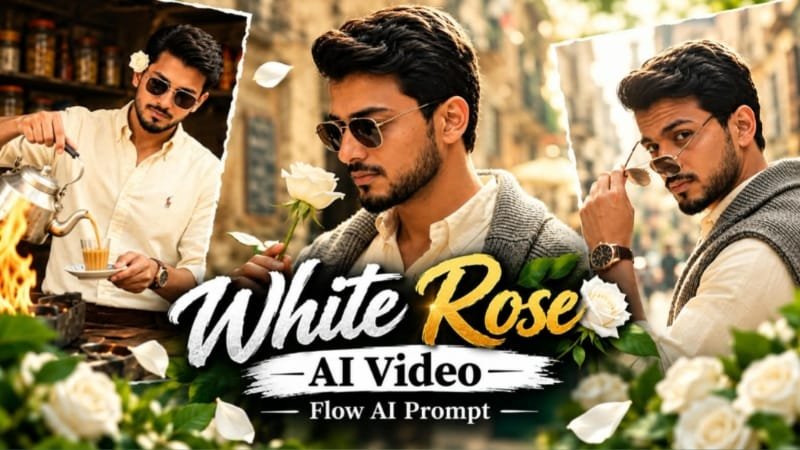
If you have been scrolling Instagram Reels lately, you must have seen those dreamy romantic videos with soft white roses, floating petals, golden light and a couple lost in each other’s eyes. This is the White Rose Romantic AI Video trend, and it is going viral because it looks like a real cinematic wedding film, but you can make it with just one photo and one prompt. In this guide, we will show you how to create it in Google Flow step by step, with the prompt, settings, pro tips and common mistakes.
🌹 White Rose Romantic AI Video Trend Kya Hai?
Ye trend ek simple idea pe based hai.
Aap apni ek photo ya couple photo lete ho.
Phir Google Flow me usse ek romantic cinematic video me convert karte ho.
Video me white roses hote hain, petals hawa me udte hain, aur background me soft glow hota hai.
Camera slowly move karta hai, jaise kisi movie ka romantic scene ho.
Is trend ki sabse badi khaasiyat hai uska clean, soft aur premium look.
Na zyada colors, na zyada chaos.
Bas white, cream aur golden tones.
Isliye ye Valentine’s Day, anniversary, engagement aur wedding reels ke liye perfect hai.
🎬 Google Flow Kyun Best Hai Is Trend Ke Liye?
Google Flow ek AI filmmaking tool hai jo Google ke Veo video models pe chalta hai.
Isme aap text se video bana sakte ho, ya apni photo ko animate kar sakte ho.
Romantic videos ke liye ye isliye best hai:
- Camera movement bahut smooth aur cinematic aata hai
- Lighting aur petals ka effect natural lagta hai
- Photo ko start frame bana ke same face ke sath video bana sakte ho
- Newer models me vertical (9:16) video bhi milta hai, jo Reels ke liye zaroori hai
- Ek scene ke baad next shot bana ke poori mini film bhi ban sakti hai
Note: Flow ke kuch features ke liye Google AI ka paid plan chahiye hota hai. Features aur credits time ke sath change hote rehte hain, isliye start karne se pehle Flow me current options check kar lena.
📝 White Rose Romantic Google Flow Prompt (Main Prompt)
Ye main prompt hai jo aapko Google Flow me paste karna hai.
Isse aapko dreamy, cinematic aur romantic result milega.
Video Prompt
Use the uploaded reference photo for the man's face, hairstyle, skin tone, body build and height. Keep identity exactly same as reference photo — no alteration to face, body, or hairstyle in any scene. Keep his skin natural, clean, and clear exactly as shown in the reference photo — no artificial smoothing, no plastic look, no added blemishes.

Keep the person's body proportions natural and realistic, matching the exact build shown in the reference photo — do not add extra muscle, height, or bulk. This must work accurately for any person of any age or body type who uploads their own reference photo — the generated face, skin, and body must always match the uploaded photo exactly, never a generic or different look.

Outfit (same throughout, do not change): a cream/ivory button-down shirt with a small embroidered polo logo, a grey knit cardigan draped over the shoulders, rust-brown wide-leg trousers, black pointed leather boots, a rose-gold wristwatch, and stylish sunglasses.

Location (same throughout all 7 scenes, do not change): a charming old-world street café with rustic weathered stone walls, elderly patrons seated at nearby tables, hexagonal-tiled outdoor pavement, a lively street atmosphere, and — for one indoor scene — a rustic tea-stall with an open flame and metal kettle.

Color grade: rich, full, natural warm cinematic color grading built directly into the scene — realistic natural colors, warm daylight and firelight tones, cinematic contrast, never faded, never black and white, never desaturated.

Create 7 cinematic scenes, same outfit and same locations throughout:

Scene 1: Close-up shot — his feet and legs in black pointed boots and rust-brown trousers walking 7 to 8 natural steps along the hexagonal-tiled pavement, passing near a rustic wooden bench, natural daylight.

Scene 2: Close-up torso shot — he holds a single white rose delicately in one hand at chest height, no sunglasses yet, an elderly patron seated at a table softly blurred behind him inside the rustic café.

Scene 3: Close-up over-the-shoulder shot — he removes his sunglasses with one hand, glancing back toward the camera, bright sunlit background, the rose-gold watch visible on his wrist.

Scene 4: Close-up shot — sunglasses now on, he gently holds the white rose up to his face and smells it, weathered stone café wall and blurred patrons behind him.

Scene 5: Close-up shot — he tilts his head back with sunglasses reflecting the light, calm relaxed confident pose, same weathered stone wall and café atmosphere behind him.

Scene 6: Medium shot — indoors, he pours tea from a traditional metal kettle over an open flame into a small cup and saucer, sunglasses on, the white rose tucked behind his ear, warm firelight glowing on his face, rustic tea-stall setting.

Scene 7: Final medium shot — back outdoors on the bright sunlit street, he walks forward holding the white rose near his chest, head lowered thoughtfully then lifting to look at the camera, café tables and passersby softly blurred behind him, cinematic slow zoom-out to finish.

Format: 16:9 widescreen, 4K/8K ultra-realistic quality, continuous fashion-editorial story flow from Scene 1 to Scene 7, no scene skipped, smooth cinematic transitions between Prompt kaise use karna hai:
- Flow me Frames to Video select karo
- Apni clear photo ko start frame me upload karo
- Upar wala prompt paste karo
- Aspect ratio 9:16 rakho agar Reels ke liye bana rahe ho
- Generate pe click karo
💑 Couple Version Prompt (Romantic Duo)
Agar aapke paas couple photo hai, to ye version use karo.
Isme dono ki chemistry aur eye contact pe focus hota hai.
[Paste your Couple version White Rose Romantic Google Flow prompt here]🧍 Solo Portrait Version Prompt
Solo photo ke liye ye version best hai.
Girls ke liye ye especially popular hai, jisme white rose bouquet aur soft smile hoti hai.
[Paste your Solo Portrait White Rose Romantic Google Flow prompt here]🎥 Slow Motion Petal Rain Prompt
Ye prompt un logo ke liye hai jinhe zyada dramatic effect chahiye.
White rose petals slow motion me girte hain aur video ekdum movie jaisa lagta hai.
[Paste your Slow Motion Petal Rain prompt here]🪜 Step-by-Step: Google Flow Me White Rose Video Kaise Banaye
Step 1: Google Flow open karo
Browser me Google Flow kholo aur apne Google account se login karo.
Step 2: New Project banao
“New Project” pe click karo.
Project ka naam kuch bhi rakh do, jaise “White Rose Romantic”.
Step 3: Mode select karo
Photo se video banana hai to Frames to Video choose karo.
Sirf text se banana hai to Text to Video choose karo.
Step 4: Photo upload karo
Ek clear, front-facing aur high-quality photo upload karo.
Photo jitni saaf hogi, face utna hi accurate aayega.
Step 5: Prompt paste karo
Upar diya hua prompt paste karo.
Chaho to apne hisaab se outfit, location ya lighting thodi change kar sakte ho.
Step 6: Aspect ratio set karo
Reels ya Shorts ke liye 9:16 select karo.
YouTube ya landscape video ke liye 16:9 rakho.
Step 7: Generate karo
Generate pe click karo aur thoda wait karo.
Result aane me kuch minute lag sakte hain.
Step 8: Best clip choose karo
Agar ek try me perfect nahi aaya to prompt me thoda change karke dobara generate karo.
Jo clip sabse achhi lage usse download kar lo.
Step 9: Extra shots add karo (optional)
Flow ke Extend ya next shot feature se video ko lamba bana sakte ho.
Isse aapko 2-3 shots ki ek mini romantic film mil jayegi.
🎞️ Final Editing Kaise Kare (CapCut / VN Me)
Google Flow se video download karne ke baad ek finishing touch dena zaroori hai.
Isse video ekdum viral-ready ban jata hai.
- CapCut ya VN me video import karo
- Beat-sync ke liye koi soft romantic song lagao
- Halka warm color grade add karo
- Slow zoom ya fade transition use karo
- Text me ek romantic line ya couple ka naam likh do
- Export 1080p me karo aur Reels pe upload kar do
⚖️ AI Tools Comparison: Kaun Sa Tool Kis Kaam Ka?
| Tool | Best For | Video Banata Hai? | Difficulty |
|---|---|---|---|
| Google Flow | Cinematic photo-to-video, smooth camera motion | Haan | Easy |
| Google Gemini | Prompt likhna aur Veo se video banana | Haan | Easy |
| ChatGPT | Prompt writing aur image generation | Nahi (image ke liye best) | Easy |
| CapCut | Editing, music, transitions, templates | Editing tool hai | Easy |
| VN Editor | Free editing, color grading, beat sync | Editing tool hai | Easy |
| Midjourney | Ultra aesthetic image bananey ke liye | Nahi (image ke liye best) | Medium |
| Leonardo AI | Stylized image creation | Nahi (image ke liye best) | Medium |
Best combo: ChatGPT ya Midjourney se white rose wali perfect image banao, Google Flow me usse animate karo, aur CapCut me final edit kar do.
💡 Pro Tips For Best White Rose Romantic Video
- Clear photo use karo. Blurry ya low-light photo se face bigad sakta hai
- Simple background wali photo lo. Isse AI ko roses aur petals add karne me aasani hoti hai
- Prompt me lighting zaroor likho. “Soft golden hour glow” jaise words result ko premium banate hain
- Camera movement ek hi rakho. Ek video me slow push-in ya slow orbit, dono ek sath mat mango
- Color palette limited rakho. White, cream aur soft gold, bas
- Ek prompt me bahut saari cheezein mat daalo. Zyada detail se AI confuse ho jata hai
- 2-3 baar generate karo. Har generation thoda alag aata hai, best wala chun lo
- Video chhota rakho. 5-8 second ke clips Reels pe zyada achhe chalte hain
❌ Common Mistakes Jo Avoid Karni Hain
- Group photo upload karna, isse faces mix ho sakte hain
- Photo me sunglasses ya heavy filter hona
- Prompt me red, pink aur blue jaise zyada colors mention karna, isse white rose theme kharab ho jati hai
- Bahut fast camera movement maangna
- Video ko bina edit kiye post kar dena
❓ FAQs: White Rose Romantic AI Video Prompt
1. White Rose Romantic AI video kya hota hai?
Ye ek AI-generated cinematic video hota hai jisme white roses, floating petals aur soft golden light ke sath romantic mood dikhaya jata hai. Isme aapki photo ko animate karke movie jaisa scene banaya jata hai.
2. Kya main white rose romantic video Google Flow me free me bana sakta hoon?
Flow ka access aur credits aapke Google account aur plan pe depend karte hain. Kuch features free me limited milte hain, aur full experience ke liye paid plan lagta hai. Best hai ki Flow me jaake current plan details check kar lo.
3. White rose video ke liye kaunsi photo best rehti hai?
Front-facing, clear aur well-lit photo best rehti hai. Simple background aur soft expression wali photo se roses aur petals ka effect sabse natural aata hai.
4. Couple photo se ye video ban sakta hai kya?
Haan, bilkul. Couple photo ke sath ek alag prompt use karna better hota hai jisme dono ke eye contact, closeness aur romantic chemistry pe focus ho.
5. White rose video Reels ke liye kaise export karu?
Flow me 9:16 vertical ratio select karo, video download karo, phir CapCut ya VN me music aur color grade add karke 1080p me export karo.
6. White rose romantic video me kaunsa song lagana chahiye?
Koi slow, soft aur romantic track lagao. Trending romantic Hindi ya instrumental songs Reels pe achhe perform karte hain. Song lagate time Instagram ke licensed audio library se hi choose karna better hai.
7. Kya white rose romantic video wedding ya anniversary ke liye use kar sakte hain?
Bilkul. White rose ka theme wedding, engagement, anniversary aur Valentine’s Day, sab ke liye perfect lagta hai. Bas prompt me occasion ka mention kar do.
8. Video me face sahi nahi aa raha, kya karu?
Ek zyada clear photo upload karo, prompt chhota aur simple rakho, aur 2-3 baar dobara generate karo. Ek hi scene aur ek hi camera movement rakhne se face zyada stable rehta hai.
🚀 Final Words
White Rose Romantic AI Video trend ka jaadu uski simplicity me hai.
Ek photo, ek prompt aur Google Flow, bas itna hi chahiye.
Thodi si practice ke baad aap bhi aisa cinematic video bana loge jo Reels pe log save aur share karenge.
Agar aapko ye article pasand aaya to apne dosto aur couple ke sath share karo.
Aur ha, aisi hi latest AI photo editing prompts, Google Flow video prompts, CapCut aur VN templates ke liye hamara Telegram channel abhi join karo.
👉 Join MeraPrompt Telegram Channel for daily new prompts and viral trends.
Follow us on Instagram @meraprompt for more trending content.