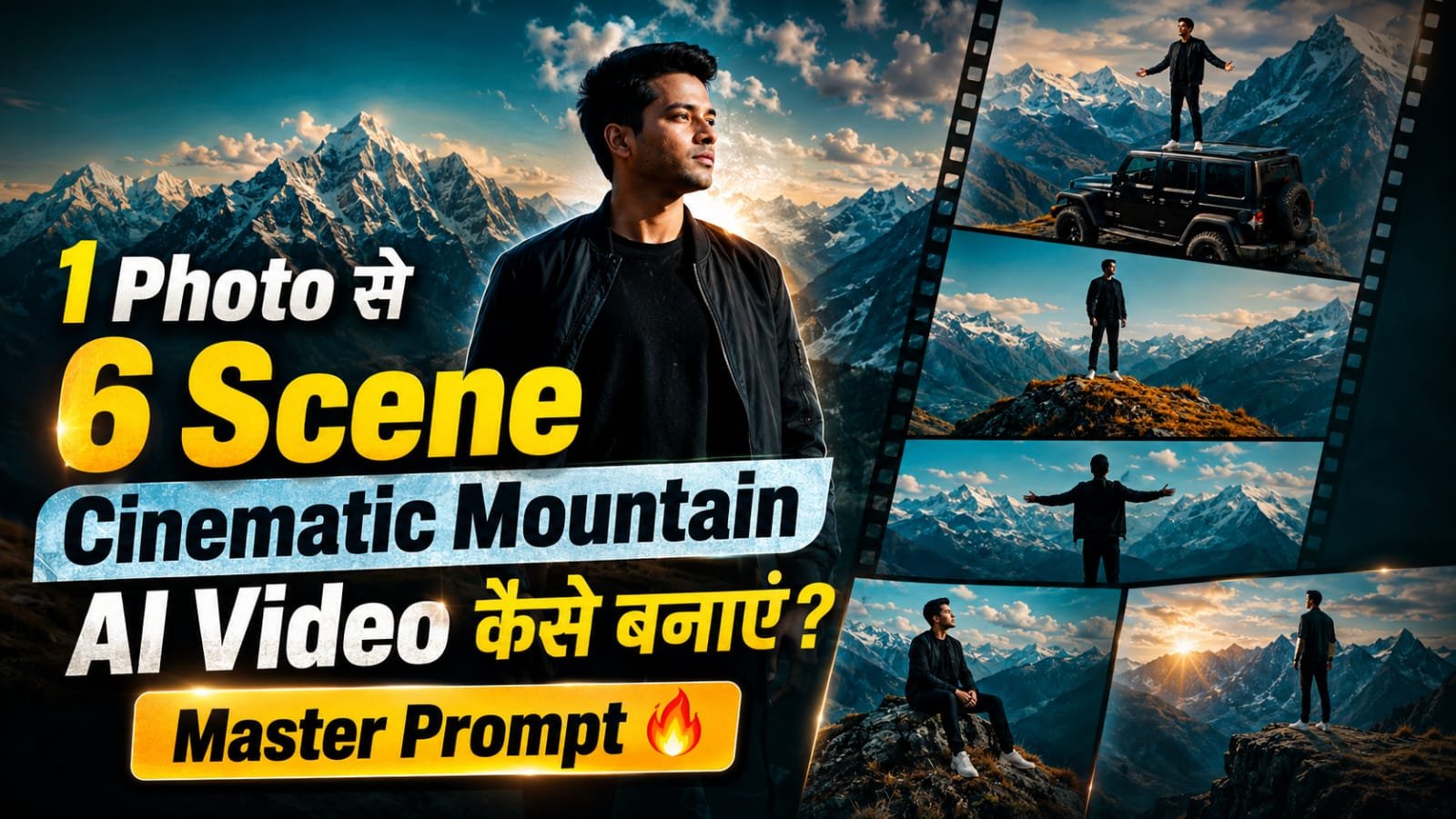
This type of video is going very viral on Instagram. You can create this type of viral video with this prompts. Here is the full detailed guide.
Photo Prompt ⤵️
Use the uploaded person photo as the strict face, identity and full-body reference, and use the uploaded original reference video as the exact reference for the shot order, pose flow, outfit, vehicle, background, mountain location, zoom feel, atmosphere and cinematic colour grading.
If no separate person photo is provided, use the visible person from the reference video as the identity reference and preserve that exact same person consistently in all panels.
Create ONE single premium ultra-realistic vertical 9:16 cinematic storyboard collage containing exactly 6 connected panels arranged in a clean 2 columns × 3 rows layout. This must be one single collage image, not 6 separate images.
UNIVERSAL IDENTITY LOCK:
This prompt must work correctly with any uploaded person — male or female, child, teenager, adult or elderly.
Preserve the uploaded person’s exact facial identity, facial structure, eyes, nose, lips, jawline, skin tone, hairstyle, natural age, gender presentation, natural height, shoulder width, body shape, arm length, leg length and realistic body proportions in every panel.
The subject must remain exactly the same in all 6 panels. Never make the subject taller, shorter, thinner, heavier, more muscular, older, younger, bigger or smaller. Never replace the person with a random boy, girl, man or woman.
OUTFIT LOCK:
Keep the exact same outfit in every panel as seen in the reference video. Preserve the same premium dark outfit, same clothing layers, same colours, same fitting, same folds and same overall styling. No outfit change in any panel.
VEHICLE LOCK:
Where the vehicle appears, keep the same dark off-road SUV / jeep-like vehicle as in the reference video. Preserve its same shape, proportions, body style, wheels and overall look. Do not change the vehicle model or colour.
LOCATION AND VISUAL LOCK:
Keep the same exact mountain environment from the reference video in every panel: dry golden-brown plateau or ridge, deep blue valley, distant snow-covered mountains, cool teal-blue sky, soft haze, sparse natural surroundings and premium cinematic atmosphere.
Use the same cinematic colour grading as the reference video: cool teal-blue tones in the sky and mountains, muted earthy browns on the ground, soft contrast, natural depth and realistic live-action mood.
PANEL 1 — WIDE ESTABLISHING SHOT:
A wide cinematic establishing panel showing the subject standing on top of the same parked dark vehicle or elevated position as in the reference video. The giant valley and distant snow mountains are visible behind. The subject stands calmly and begins a very slight natural outward arm movement. Premium landscape framing, realistic scale, calm mood.
PANEL 2 — EMOTIONAL CLOSE-UP:
A medium close-up of the same subject with the exact same face. The subject gently raises the chin and looks slightly upward, matching the emotional feeling of the reference video. Background is softly blurred mountain scenery. Add subtle wind movement in hair or clothing. Face must remain perfectly consistent.
PANEL 3 — ULTRA-WIDE ARMS-OPEN SHOT:
An ultra-wide cinematic panel showing the subject smaller in frame against the huge mountain landscape and sky. The subject slowly opens both arms outward in a calm expressive pose while standing naturally and safely. Preserve realistic body balance, same outfit and same environment.
PANEL 4 — LIGHT-WASH TRANSITION MOMENT:
A wide panel in the same mountain composition showing the subtle atmospheric light-wash or soft visual sweep effect seen in the reference video. The subject remains in the same place and relaxes the arms slightly. The effect must feel soft, cinematic and realistic, not fantasy-like.
PANEL 5 — LONG SHOT ON RIDGE:
A very long shot showing the same subject standing alone on the mountain ridge or open plateau. The person appears small against the massive sky and distant snowy peak. Calm posture, subtle wind in the outfit, natural lonely cinematic mood, huge environmental scale.
PANEL 6 — FINAL WALKING SHOT:
A medium-wide cinematic panel showing the same subject walking naturally across the same mountain ground. While walking, the subject gradually spreads both arms wide, matching the emotional ending feel of the reference video. Keep realistic steps, natural foot contact, correct anatomy, gentle clothing movement and distant snowy mountains in the background.
QUALITY:
Ultra-realistic live-action cinematic photography, DSLR-style realism, crisp details, realistic skin texture, natural hands, correct anatomy, authentic lens depth, realistic mountain atmosphere, subtle filmic grading, premium 4K/8K feel.
NEGATIVE RULES:
No face change, no identity change, no age change, no height change, no body-size change, no beautification, no extra people, no duplicate subject, no deformed hands, no extra fingers, no broken anatomy, no floating feet, no wrong vehicle, no background replacement, no city, no forest, no random location, no cartoon, no painting, no illustration, no over-AI look, no text, no captions, no logo, no watermark.
Video Prompt ⤵️
Create one premium ultra-realistic live-action cinematic AI video, exactly 10.0 seconds long, using the uploaded person photo as the strict identity and full-body reference, and using the uploaded original reference video as the exact reference for shot order, camera framing, zoom style, body movement, outfit, background, location, atmosphere and colour grading.
If no separate person photo is provided, use the visible person from the reference video as the identity reference and preserve that same person consistently throughout.
OUTPUT:
Horizontal cinematic 16:9, exactly 10 seconds, realistic live-action quality, smooth professional editing, natural body motion, no AI look.
UNIVERSAL IDENTITY LOCK:
This prompt must work correctly with any uploaded person — male or female, child, teenager, adult or elderly.
Preserve the exact same face, hairstyle, skin tone, natural age, gender presentation, natural height, shoulder width, body shape, arm length, leg length and realistic body proportions in every shot.
The subject must remain exactly the same person in all 6 scenes. Never make the subject taller, shorter, thinner, heavier, more muscular, older, younger, bigger or smaller. Never replace the person with a random boy, girl, man or woman.
OUTFIT LOCK:
Keep the same outfit in every scene exactly as in the reference video. Preserve the same clothing colors, fitting, folds, jacket length and overall styling.
BACKGROUND AND LOCATION LOCK:
Keep the same exact outdoor mountain location as the reference video: dry golden-brown ground, deep blue valley, distant snow-covered mountains, cold teal-blue sky, slight haze, sparse natural surroundings and premium cinematic atmosphere.
CAMERA AND STYLE LOCK:
Match the same cinematic framing, slow zoom feeling, emotional close-up feel, wide landscape scale and overall movie-like tone from the original reference video.
Use realistic optical zoom feel only. No fake stretch zoom.
Use the same cool teal-blue and muted earthy colour grading as the reference.
Keep everything natural and premium.
EXACT 10-SECOND TIMELINE WITH 6 SCENES:
SCENE 1 — 0.00 to 1.40 sec
Begin with a wide establishing shot of the subject standing on top of the same parked vehicle or same elevated position seen in the reference video. Show the large valley and distant snow mountains in the background. The subject stands calmly and begins a slight natural arm movement outward. Use a slow smooth push-in.
SCENE 2 — 1.40 to 2.80 sec
Cut to an emotional medium close-up of the same subject. Preserve the exact face. The subject gently raises the chin and shifts the gaze upward, matching the feel of the original video. Background remains softly blurred mountain scenery. Add slight wind movement in hair or outfit.
SCENE 3 — 2.80 to 4.20 sec
Cut to an ultra-wide cinematic shot. The subject appears smaller in frame with the huge sky and mountain landscape visible. The subject slowly opens both arms outward in a calm expressive pose. Use a gentle cinematic zoom-in. Keep balance natural and body proportions unchanged.
SCENE 4 — 4.20 to 5.60 sec
Continue with the same wide mountain composition and recreate the moment where a soft atmospheric light sweep / gentle visual wash passes through the frame, just like the reference feel. The subject remains in the same location and relaxes the arms slightly. Keep the effect subtle and realistic, not fantasy-like.
SCENE 5 — 5.60 to 7.20 sec
Cut to a very long shot with the subject standing alone on the mountain ridge or open plateau. The subject appears small against the massive sky and distant snowy peak. The subject remains mostly still with subtle breathing and slight outfit movement in the wind. Use a slow zoom-in.
SCENE 6 — 7.20 to 10.00 sec
Cut to the final medium-wide cinematic shot of the subject walking naturally across the same mountain ground. While walking, the subject gradually spreads both arms wide, matching the emotional ending from the reference video. Keep realistic foot contact, natural jacket movement and correct anatomy. End with a smooth fade to black during the final 0.30 seconds.
REALISM REQUIREMENTS:
The video must look like real live-action footage, not like CGI or obvious AI.
Use correct walking physics, natural hand motion, stable face consistency, realistic cloth movement, proper depth, smooth cuts and premium cinematic quality.
Where the original reference video has zoom, use similar zoom feel.
Where the original reference video has a calm hold, keep a calm hold.
Where the original reference has a transition feel, recreate that same feel naturally.
NEGATIVE RULES:
No face change, no identity change, no age change, no height change, no body-size change, no extra people, no duplicate subject, no deformed hands, no extra fingers, no floating feet, no broken anatomy, no random outfit change, no background change, no wrong location, no city scene, no forest replacement, no cartoon look, no over-stylized AI look, no fast motion, no shaky camera, no lip-sync, no talking, no text, no logo, no watermark.
o