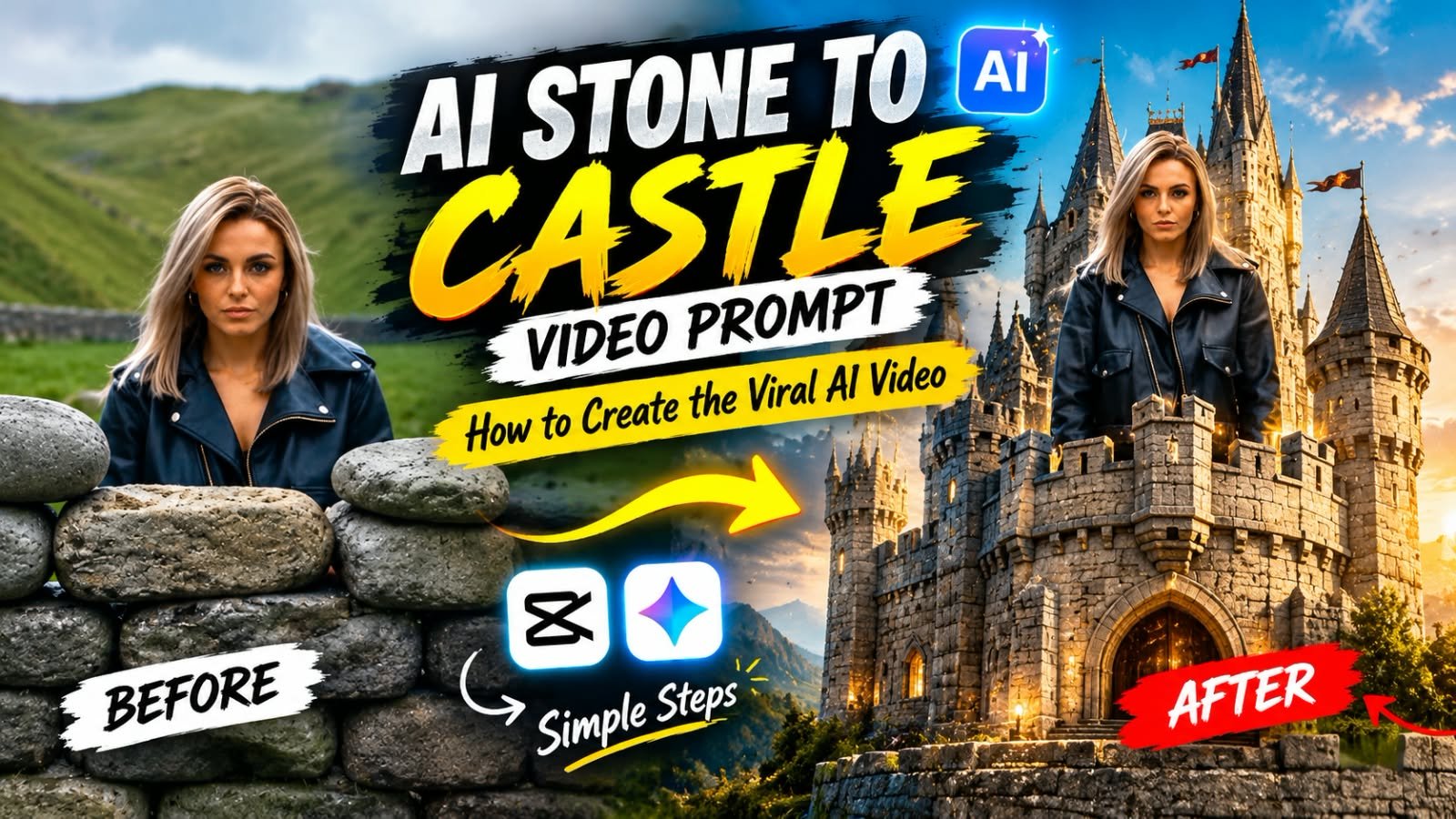
An AI video is going viral on Instagram right now. In the video, a woman stands alone while hundreds of angry women throw stones at her. Instead of running away or fighting back, she calmly transforms those same stones into a magnificent castle.
You have probably seen this incredible transformation in your Instagram Reels feed. The combination of cinematic visuals, a powerful story, and a magical transformation makes the video truly eye-catching.
In this article, I will share the complete method to recreate the viral AI Stone to Castle Video. You will get the photo editing prompt, three ready-to-use AI video prompts, and a simple trick to replace the original character’s face with your own.
Everything is explained step by step, so you can easily copy and paste the prompts into your preferred AI tools.
Meta Description: Create the viral AI Stone to Castle video using your own face. Get 3 copy-paste AI video prompts, the face swap trick, and a complete step-by-step tutorial.
Slug: ai-stone-to-castle-video-prompt
Focus Keywords: AI stone to castle video prompt, viral AI video prompt, Veo 3 video prompt
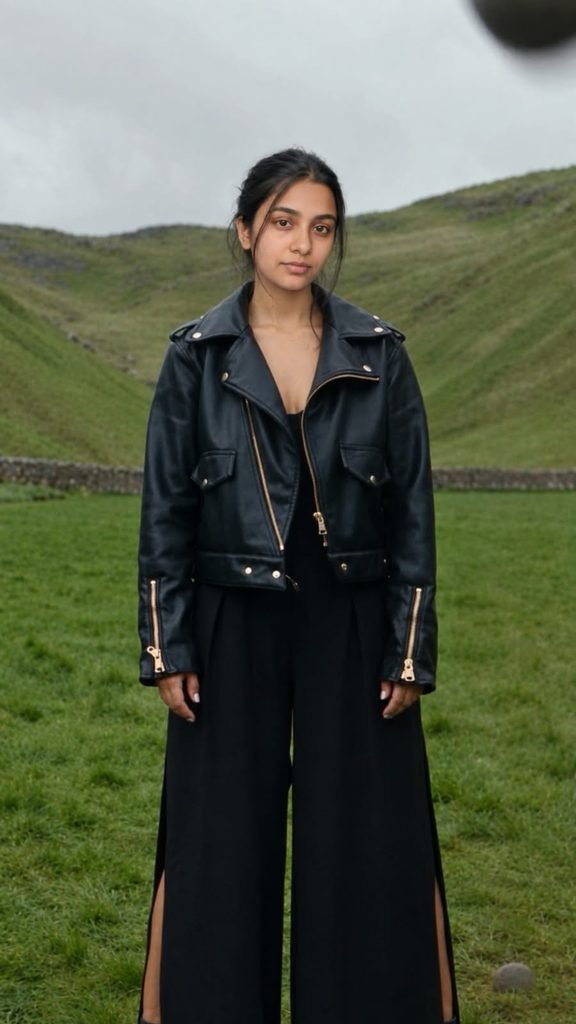
Replace the face of the woman in the black leather jacket in the first image completely with the face of the person in the second image. The new face must match the second image exactly: same facial structure, eyes, nose, lips, skin tone and expression style. Keep her hair style, black cropped leather jacket with gold zippers, wide-leg black pants, pose, body position, background, lighting and the crowd exactly the same. Only the face and identity change.Video Prompt
Prompt 1 0 T0 10 Second
Vertical 9:16 cinematic video, photorealistic, moody overcast sky, lush green Irish-style valley with steep rocky hills, muted natural color grade, soft diffused light, shallow depth of field. MAIN CHARACTER (use the face from the reference photo, keep the face identical in every shot): a woman with shoulder-length ash-blonde hair, wearing a black cropped leather biker jacket with gold zippers and wide-leg black pants, calm, strong and fearless. The crowd: dozens of angry women in colorful casual clothes (red puffer jacket, yellow raincoat, pink hoodie, plaid shirt). Same character, same outfit, same location, same lighting and color grade throughout. No text, no subtitles, no logos.

CLIP 1 of 3 (10 seconds).
0-3s: Wide shot of the valley. A huge crowd of angry women stands behind two piles of stones and hurls stones toward the camera, stones flying through the air.
3-5s: Close-ups of furious women shouting and pointing, stones raised in their hands.
5-8s: The main character stands alone and perfectly still on the green grass, hands by her sides, calm and unshaken, stones landing around her.
8-10s: Extreme close-up of a grey stone resting in the grass, her hand reaches down and picks it up. End on her hand holding the stone.
Prompt 2 10 To 20 Second
Vertical 9:16 cinematic video, photorealistic, moody overcast sky, lush green Irish-style valley with steep rocky hills, muted natural color grade, soft diffused light, shallow depth of field. MAIN CHARACTER (use the face from the reference photo, keep the face identical in every shot): a woman with shoulder-length ash-blonde hair, wearing a black cropped leather biker jacket with gold zippers and wide-leg black pants, calm, strong and fearless. The crowd: dozens of angry women in colorful casual clothes (red puffer jacket, yellow raincoat, pink hoodie, plaid shirt). Same character, same outfit, same location, same lighting and color grade throughout. No text, no subtitles, no logos.

CLIP 2 of 3 (10 seconds). Continues directly from Clip 1, starting exactly where it ended: the main character's hand holding the grey stone.
0-3s: She crouches in the grass and calmly places the stone on the ground, lining up more stones in a neat row. Medium shot, focused, determined.
3-6s: High angle shot: a stone wall magically rises from the row of stones beside her, while the crowd runs and throws stones from far behind. The stones bounce off the wall.
6-8s: She peeks over the top of the stone wall, calm and confident, looking straight into the camera.
8-10s: The wall keeps growing taller and wider, turning into a round stone tower with battlements, with her rising up on top of it. End on her standing on the tower under the cloudy sky.
What Is the AI Stone to Castle Video and Why Is It Going Viral?
The entire story unfolds in approximately 30 seconds, and that is what makes this AI video so engaging.
The scene begins in a beautiful green valley surrounded by steep, rocky hills. A huge crowd of angry women gathers in the background and throws stones toward a woman standing alone in the foreground.
The woman wears a black leather jacket and wide-leg black pants. Despite the aggressive crowd, she remains completely calm and fearless.
Instead of reacting to the crowd, she picks up a stone and begins arranging more stones in a neat row. Slowly, a stone wall rises from the ground. The wall grows taller, transforms into a tower, and eventually becomes a magnificent gothic castle.
In the final scene, the woman stands confidently in a castle window, looks down at the crowd, and smiles calmly.
People love this video because it combines three powerful elements: inspiration, surprise, and cinematic visuals.
The best part? You can recreate the same concept using your own face or the face of another person who has given you permission.
What Do You Need to Create This AI Video?
Before getting started, make sure you have the following:
- Google Flow (Veo): To generate the AI video clips.
- Nano Banana or another AI image editor: To replace the original character’s face.
- A clear front-facing photo: Use a well-lit photo of yourself for better identity consistency.
- Three AI video prompts: The ready-to-use prompts provided below.
- CapCut or VN Video Editor: To combine the clips into one complete video.
You can complete most of the process using your mobile phone or computer.
Step 1: Replace the Face in the Photo First
This is the most important step in the entire process.
If you generate the video directly using the original reference, the AI may continue using the original character’s face instead of yours. To reduce this problem, first create an edited opening image in which the character has your face.
This image will become the starting frame for your first video clip.
What you need to do:
- Take a screenshot of the opening frame showing the woman standing alone in the valley.
- Open Nano Banana or your preferred AI image editor.
- Upload the screenshot as the first image.
- Upload your own clear photo as the second image.
- Copy and paste the following prompt.
Face Swap Photo Prompt
Replace the face of the woman in the black leather jacket in the first image completely with the face of the person in the second image. The new face must match the second image as closely as possible, including facial structure, eyes, nose, lips, skin tone, and natural facial features.

Keep her hairstyle, black cropped leather jacket with gold zippers, wide-leg black pants, pose, body position, background, lighting, camera angle, and the crowd exactly the same.

Only replace the face and identity. Do not change the body, outfit, hairstyle, background, composition, or any other visual element. Preserve natural skin texture and realistic facial proportions. Make the final image photorealistic and seamless.
Once the image editor generates the result, save the edited image. This is your Start Frame for Clip 1.
Tip: Use a clear, front-facing reference photo with good lighting. AI tools may not preserve every facial detail perfectly in every frame, but using the same reference consistently can help.
Step 2: Generate the Three AI Video Clips
The complete video is divided into three clips of approximately 10 seconds each.
To make the final video look like one continuous cinematic scene, keep the character description, outfit, location, lighting, and visual style consistent across all three prompts.
Whenever your video tool supports reference images or starting frames, use them to improve continuity.
Prompt 1: The Rain of Stones (0–10 Seconds)
In the first clip, a huge crowd throws stones while the main character stands alone. At the end, she picks up a grey stone, setting up the transformation in the next clip.
Copy and paste this prompt:
Vertical 9:16 cinematic video, photorealistic, moody overcast sky, lush green Irish-style valley with steep rocky hills, muted natural color grade, soft diffused light, shallow depth of field.

IDENTITY RULE (highest priority): The main character's face must closely match the person in the provided reference photo, preserving the same facial structure, eyes, nose, lips, jawline, skin tone, and natural features. Do not use a different person's face. Maintain consistent identity throughout the clip, including close-ups, wide shots, and movement.

CHARACTER: She wears a black cropped leather biker jacket with gold zippers and wide-leg black pants, with shoulder-length ash-blonde hair. She is calm, strong, and fearless.

THE CROWD: Dozens of angry women in colorful casual clothing, including a red puffer jacket, yellow raincoat, pink hoodie, and plaid shirt. Maintain the same location, lighting, and color grade throughout the scene.

No text, no subtitles, no logos.

CLIP 1 OF 3 — 10 SECONDS.

0–3 seconds: Wide establishing shot of the green valley. A huge crowd of angry women stands behind two piles of stones and throws stones toward the main character. Stones fly through the air in a dramatic cinematic sequence.

3–5 seconds: Close-up shots of furious women shouting and pointing, with stones raised in their hands. Keep the scene realistic and cinematic.

5–8 seconds: The main character stands alone and perfectly still on the green grass. Her face remains consistent with the reference photo. Her hands rest naturally by her sides as stones land around her. She remains calm and unshaken.

8–10 seconds: Extreme close-up of a grey stone resting in the grass. The main character's hand reaches down, picks it up, and holds it firmly. End with her hand holding the stone, ready for the next clip.
Expected result: The first clip establishes the story, introduces the crowd, and ends with the main character holding a stone.
Prompt 2: The Stone Wall Begins to Rise (10–20 Seconds)
In the second clip, the woman starts arranging stones. A magical transformation begins as a wall rises from the ground and gradually becomes a stone tower.
For better continuity, take a screenshot of the final frame of Clip 1 and use it as the starting frame for Clip 2.
Copy and paste this prompt:
Vertical 9:16 cinematic video, photorealistic, moody overcast sky, lush green Irish-style valley with steep rocky hills, muted natural color grade, soft diffused light, shallow depth of field.

IDENTITY RULE (highest priority): The main character's face must closely match the person in the provided reference photo, preserving the same facial structure, eyes, nose, lips, jawline, skin tone, and natural features. Maintain consistent identity throughout the clip.

CHARACTER: She wears a black cropped leather biker jacket with gold zippers and wide-leg black pants, with shoulder-length ash-blonde hair. She is calm, strong, and fearless.

THE CROWD: Dozens of angry women in colorful casual clothing, including a red puffer jacket, yellow raincoat, pink hoodie, and plaid shirt. Maintain the same location, lighting, and color grade as the previous clip.

No text, no subtitles, no logos.

CLIP 2 OF 3 — 10 SECONDS.

CONTINUITY: Continue directly from Clip 1, beginning with the main character's hand holding the same grey stone.

0–3 seconds: The woman crouches on the grass and calmly places the stone on the ground. She begins arranging additional stones in a neat row. Use a medium shot that shows her face, hands, and focused expression.

3–6 seconds: A magical transformation begins. A strong stone wall rises from the arranged stones beside her, with individual stones fitting together realistically. In the background, the crowd continues throwing stones, which bounce harmlessly off the newly formed wall.

6–8 seconds: The woman calmly peeks over the top of the stone wall. She looks directly into the camera with a confident expression. Keep her face consistent with the reference photo.

8–10 seconds: The stone wall grows taller and wider, transforming into a round stone tower with battlements. The woman rises with the structure and stands confidently on top of the tower beneath the cloudy sky.

End with a dramatic wide shot of the woman standing on the newly formed stone tower.
Expected result: The stones transform into a defensive tower while the woman remains calm and confident.
Prompt 3: The Grand Castle and the Final Victory (20–30 Seconds)
The third clip delivers the final transformation. The stone tower grows into a magnificent gothic castle, leaving the crowd stunned.
Use a screenshot of the last frame of Clip 2 as the starting frame for Clip 3.
Copy and paste this prompt:
Vertical 9:16 cinematic video, photorealistic, moody overcast sky, lush green Irish-style valley with steep rocky hills, muted natural color grade, soft diffused light, shallow depth of field.

IDENTITY RULE (highest priority): The main character's face must closely match the person in the provided reference photo, preserving the same facial structure, eyes, nose, lips, jawline, skin tone, and natural features. Maintain consistent identity throughout the clip.

CHARACTER: She wears a black cropped leather biker jacket with gold zippers and wide-leg black pants, with shoulder-length ash-blonde hair. She is calm, strong, and fearless.

THE CROWD: Dozens of angry women in colorful casual clothing, including a red puffer jacket, yellow raincoat, pink hoodie, and plaid shirt. Maintain the same location, lighting, and color grade as the previous clips.

No text, no subtitles, no logos.

CLIP 3 OF 3 — 10 SECONDS.

CONTINUITY: Begin with the main character standing on top of the stone tower created in Clip 2.

0–3 seconds: Low-angle cinematic shot. The stone tower rapidly expands and transforms into a grand gothic castle with tall spires, massive stone walls, arched windows, and blue slate roofs. The castle rises dramatically behind the woman as she remains calm and confident.

3–5 seconds: Close-up of the crowd of women looking up in complete shock. Their mouths are open, and the stones remain in their hands as they witness the transformation.

5–7 seconds: Wide cinematic shot of the enormous castle standing between the lush green rocky hills. The crowd appears tiny in the foreground, and several stones fall from their hands.

7–10 seconds: The woman stands in an elegant arched castle window. She looks down at the crowd, slowly raises her eyes toward the camera, and gives a calm, confident smile. Her face remains consistent with the reference photo. End with a slow cinematic push-in toward her face.
Expected result: The tower transforms into a grand castle, and the woman finishes the story with a confident smile.
Step 3: Tips to Keep the Same Face in All Three Clips
One of the biggest challenges when generating AI videos is maintaining the same face throughout multiple clips.
Even when you upload a reference photo, the AI model may slightly change the facial features, hairstyle, or appearance between shots.
Follow these tips to improve consistency.
For Clip 1:
- Select the Frames to Video or equivalent image-to-video option in your AI video tool.
- Upload the edited image you created in Step 1 as the starting frame.
- Add your original photo as a character reference if the tool supports it.
For Clip 2:
- Take a screenshot of the final frame of Clip 1.
- Use that screenshot as the starting frame.
- Upload your reference photo again to reinforce the character’s identity.
For Clip 3:
- Take a screenshot of the final frame of Clip 2.
- Use it as the starting frame for the final clip.
- Add the same reference photo again.
Additional Tips
- Use the same character description in all three prompts.
- Keep the outfit, hairstyle, location, and lighting consistent.
- Avoid changing the reference photo between clips.
- Use close-up shots when the character’s facial identity needs to be clearly visible.
- If a generated frame has the wrong face, correct that frame using your image editor before continuing, where your workflow allows it.
- If your video tool only generates 8-second clips, remove or shorten the final action in each prompt and adjust the timing accordingly.
Remember that these steps improve consistency but cannot guarantee a perfect face match in every frame.
Negative Prompt for Better Results
If your AI video generator supports a negative prompt field, use the following text to reduce common visual problems.
original face, old face, different face, face changing between shots, face morphing, different person, inconsistent facial features, blurry face, distorted face, deformed hands, extra fingers, extra limbs, unnatural movement, flickering, inconsistent hairstyle, different outfit, changing background, unrealistic stones, distorted castle architecture, text, subtitles, watermark, logo, low resolution
A negative prompt can help reduce unwanted artifacts, but results depend on the video generation model and its settings.
Step 4: Combine All Three Clips in CapCut or VN
Once all three clips are ready, the final step is to combine them into one complete video.
Follow these steps:
- Open CapCut or VN Video Editor.
- Create a new project.
- Import Clip 1, Clip 2, and Clip 3 in the correct order.
- Place the clips one after another on the timeline.
- Trim any unwanted frames at the beginning or end of each clip.
- Add a trending audio track that fits the cinematic mood.
- Adjust the music volume so the visuals remain the main focus.
- Export the video in vertical 9:16 format at the highest practical quality supported by your editor.
Your AI Stone to Castle video is now ready to share on Instagram Reels, YouTube Shorts, or other short-video platforms.
Recommended format: Vertical 9:16.
Suggested duration: Approximately 24–30 seconds, depending on the generated clip lengths.
Frequently Asked Questions (FAQs)
1. Can I create the AI Stone to Castle video on my mobile phone?
Yes. You can use compatible browser-based AI video generators and image editors on your mobile phone. The exact features and availability depend on the tool and your account.
2. Why does the original face keep appearing in my AI video?
This can happen when the AI model follows the original reference video or image too strongly. Creating an edited starting frame with your face before generating the video can help reduce this issue.
3. Can I use someone else’s face in this video?
Use your own face or the face of someone who has given you permission. Avoid using another person’s identity without their consent, especially when the result could mislead viewers about who appears in the video.
4. What should I do if my AI tool generates only 8-second clips?
Shorten the action sequence in each prompt to fit the available duration. For example, generate three 8-second clips and combine them into a video of approximately 24 seconds.
5. Which AI video tool should I use?
Google Flow with a compatible Veo model is one option. You can also use another image-to-video generator that supports reference images or starting frames. Features, generation limits, and output quality may vary.
6. How can I make the castle transformation look more realistic?
Keep the camera movement smooth, maintain consistent lighting, and describe the transformation clearly. Use phrases such as “individual stones fitting together realistically,” “gradual architectural transformation,” and “cinematic wide shot.”
7. Do I need a separate photo prompt and video prompts?
Yes, this workflow uses a separate image-editing prompt to prepare the main character’s face, followed by three video prompts to generate the complete story.
Final Words
The viral AI Stone to Castle video is a great example of how a simple idea can become a cinematic AI-generated story.
By preparing your starting image, using consistent character references, generating three connected clips, and combining them in CapCut or VN, you can recreate the same concept with your own face.
The key is to maintain continuity between the clips and keep the character, outfit, environment, and lighting as consistent as possible.
Try the prompts above, experiment with your preferred AI tools, and create your own version of this viral transformation trend.
If you create the video, share it on Instagram and tag us. For more viral AI video prompts, editing tutorials, and creative ideas, stay connected with MeraPrompt.
See you in the next post!