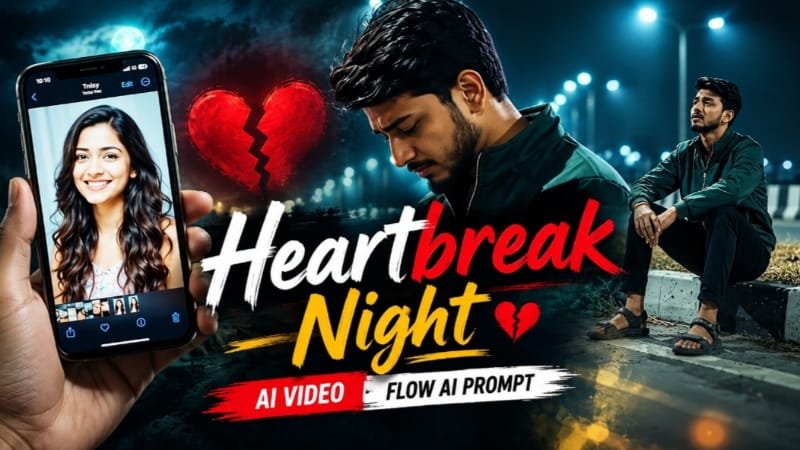
Heartbreak-themed AI night videos are taking over Instagram Reels and YouTube Shorts right now, and this trend is a perfect fit for anyone chasing that moody, cinematic, “sad boy/girl” aesthetic. Using Google Flow AI, you can turn a single emotional photo into a slow, rain-lit night video complete with camera pans, flickering streetlights, and that heartbroken expression everyone’s obsessing over. Yahan hum step-by-step dekhenge ki ye trend kaise kaam karta hai aur aap apna khud ka heartbreak night video kaise bana sakte hain.
💔 Heartbreak AI Night Video Trend Kya Hai
Ye trend basically ek emotional, cinematic short video hota hai.
Isme subject raat ke time akela khada hota hai — kabhi road pe, kabhi balcony mein, kabhi rain mein.
Lighting dark aur moody hoti hai, streetlights ya neon signs background mein blur dikhte hain.
Expression heartbroken, thoughtful ya lost hota hai — jaise koi bada dil toot gaya ho.
Camera movement slow hota hai — zoom in, slight pan, ya dolly-style motion jo real film jaisa lagta hai.
Background mein aksar koi sad Bollywood song ya lo-fi track use hota hai.
Ye trend especially un logo mein viral ho raha hai jo apni photo ko movie-poster jaisa cinematic feel dena chahte hain.
🎬 Google Flow AI Kya Hai Aur Kyun Use Karein
Google Flow AI ek video generation tool hai jo photo ya text prompt se realistic motion video bana sakta hai.
Normal photo animation tools se alag, Flow camera movement, lighting aur atmosphere ko bahut naturally handle karta hai.
Isliye heartbreak night aesthetic jaisa cinematic look banane ke liye ye best choice hai.
Flow mein aap apni khudki photo upload karke usmein realistic motion, rain effect, aur night lighting add kar sakte hain.
📝 Step-by-Step Guide: Heartbreak Night Video Kaise Banaye
Step 1: Sahi Photo Select Karein
Ek clear face photo choose karein jisme achi lighting ho aur face visible ho.
Neutral ya slightly emotional expression wali photo best result deti hai.
Step 2: ChatGPT/Gemini Se Prompt Tayyar Karein
Pehle apni photo ke base pe ek detailed cinematic prompt likhwayein jisme night setting, rain, lighting aur mood describe ho.
Step 3: Flow AI Mein Photo Upload Karein
Google Flow open karein aur apni photo upload karein.
Prompt box mein apna heartbreak night scene wala prompt paste karein.
Use Photo 1 as reference for the man's face, hairstyle, skin tone, body build and height. Use Photo 2 as reference for the woman — her photo appears only as an image displayed on a phone screen, not as a live character. Keep the man's identity exactly same as his reference photo — no alteration to face, body, or hairstyle.

Keep the person's body proportions natural and realistic, matching the exact build shown in the reference photo.

Outfit (same throughout, do not change): dark green zip-up jacket, black pants, sandals.

Location (same throughout all 7 scenes, do not change): an empty night-time highway/bridge, glowing teal-green streetlights lining the road, black-and-white striped concrete road dividers, dry grass median, a foggy dark sky, occasional distant vehicle headlights, moody nighttime atmosphere.

Mood: heartbroken, quiet, reflective, sad expression throughout, slow melancholic body language.

Color grade: cinematic cool teal-and-dark tone, moody night contrast, cinematic film-grain look.

Create 7 cinematic scenes, same outfit and same night highway location throughout:

Scene 1: Close-up shot, a hand holding up a phone displaying a photo of the woman (from Photo 2), the empty night highway and streetlights blurred softly in the background, quiet emotional moment.

Scene 2: Wide shot, the man standing alone in the middle of the empty highway, head down, streetlights glowing around him, sad and lost expression.

Scene 3: Medium shot, the man slowly walking along the road, looking down, hands relaxed, streetlights and road markings stretching into the distance.

Scene 4: Medium shot, the man sitting on the road's concrete divider, elbows resting on his knees, head down, dry grass around him, streetlight glowing behind him.

Scene 5: Medium shot, the man still sitting on the divider, now leaning back and looking up at the dark sky, a moment of quiet emotional release.

Scene 6: Medium shot, the man standing and leaning against the road barrier, head bowed, hands clasped in front of him, dim shadowy lighting.

Scene 7: Wide shot, the man standing on the road median with arms crossed, facing the camera, distant vehicle headlights approaching on the road behind him, calm but melancholic expression.

Format: 16:9 landscape, 1080p resolution, slow cinematic pacing throughout, same location and color grade maintained from Scene 1 to Scene 7.Step 4: Camera Movement Aur Motion Settings Adjust Karein
Slow zoom ya subtle pan select karein taaki video natural aur cinematic lage.
Fast ya jerky motion avoid karein, ye mood ko kharab kar sakta hai.
Step 5: Generate Aur Preview Karein
Video generate hone do, phir preview karke dekhein ki lighting aur expression sahi aa raha hai ya nahi.
Agar zaroorat ho toh prompt tweak karke dobara generate karein.
Step 6: CapCut/VN Mein Final Touch Dein
Generated video ko CapCut ya VN mein import karein.
Sad background music, subtle color grading aur text overlay add karein.
Rain sound effect ya ambient night sound bhi add kar sakte hain for extra impact.
Step 7: Export Aur Post Karein
9:16 vertical format mein export karein Reels/Shorts ke liye.
Trending hashtags ke saath post karein taaki reach zyada mile.
🛠️ AI Tools Comparison Table
| Tool | Best For | Night/Emotional Scene Quality | Ease of Use |
|---|---|---|---|
| Google Flow | Photo-to-video cinematic motion | Excellent | Medium |
| Google Gemini | Prompt refinement, scene description | Good | Easy |
| ChatGPT | Detailed prompt writing | Good | Easy |
| CapCut | Editing, music, effects, export | Very Good | Easy |
| VN | Color grading, transitions | Very Good | Easy |
| Midjourney | Static cinematic image base | Excellent (images only) | Medium |
| Leonardo AI | Alternate image styles | Good | Medium |
💡 Pro Tips
Rain aur reflection effects add karne se video zyada emotional aur realistic lagta hai.
Warm streetlight tones aur cool night shadows ka combination best cinematic contrast deta hai.
Zyada fast cuts na karein — heartbreak aesthetic slow pacing mein zyada effective hota hai.
Ek hi trend pe multiple variations bana ke test karein, konsa zyada engagement laata hai.
❓ FAQs
Q1: Kya heartbreak AI night video banane ke liye professional camera chahiye?
Nahi, sirf ek clear photo aur Google Flow AI se kaam ho jata hai.
Q2: Flow AI free hai ya paid?
Flow AI ke free aur paid dono tiers available hain, features ke hisaab se limits alag hoti hain.
Q3: Is trend ke liye best background music kaunsa hai?
Slow sad Bollywood songs ya lo-fi/piano instrumental tracks is mood ke saath best match karte hain.
Q4: Video kitna lamba hona chahiye Reels ke liye?
10-15 seconds ka clip Reels/Shorts ke liye ideal rehta hai, taaki engagement drop na ho.
Q5: Kya group photo se bhi heartbreak video ban sakta hai?
Ye trend mainly solo photos ke saath best kaam karta hai kyunki focus ek hi emotional subject pe hota hai.
📲 Aise hi trending AI photo aur video prompts ke liye MeraPrompt ka Telegram channel join karein aur sabse pehle naye trends paayein!