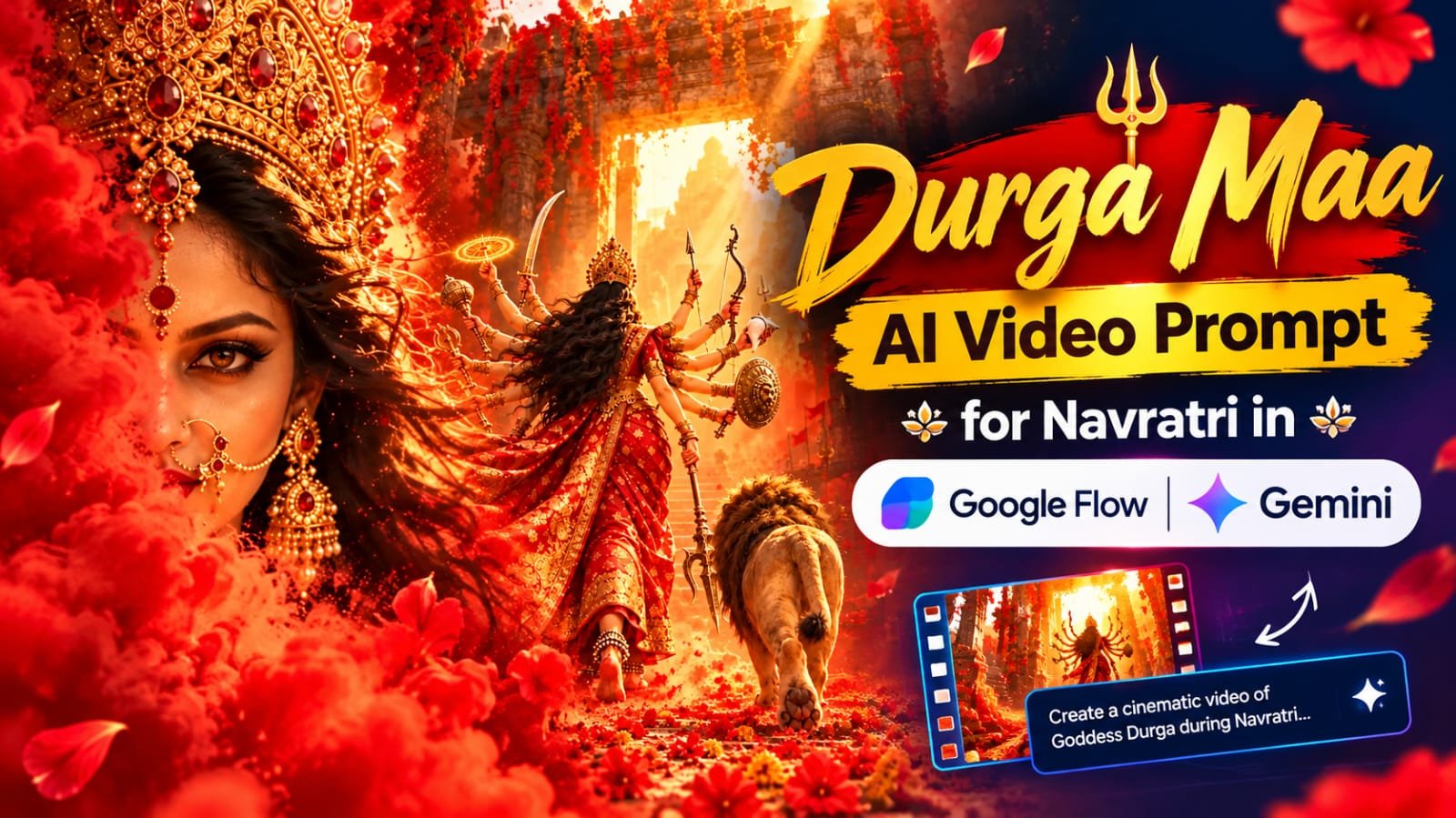
The Durga Maa cinematic reel is one of the biggest Navratri trends on Instagram right now.
It shows Maa Durga walking up a flower-covered temple stairway with her lion, red smoke all around, golden sunlight and a devotional background score.
The whole video is about 11 seconds long and you can make it with Google Gemini and Google Flow in a few minutes.
In this article, I will share the full step-by-step method, so you can create the same look for your own reels.
Durga Maa AI Video Kya Hai?
Ye ek vertical cinematic video hai, 9:16 size mein, jo Instagram Reels aur YouTube Shorts ke liye perfect hai.
Video mein Maa Durga ek ancient temple ki seedhiyon par chal rahi hain.
Seedhiyan laal aur peele phoolon se bhari hui hain.
Unke saath ek shaandar sher chal raha hai.
Poore frame mein laal rang, golden light aur red gulal ka dhuaan hai.
Isi liye ye video Navratri ke time par bahut zyada viral ho raha hai.
Video Mein Kya Kya Dikhta Hai
Video 4 shots mein banta hai.
Har shot ka apna alag mood hai.
- Shot 1: Peeche se low angle shot, Maa seedhiyon par chal rahi hain aur aage glowing temple gate hai
- Shot 2: Extreme close up, chehra laal dhuaan ke peeche se aa raha hai, golden crown aur aankhein dikhti hain
- Shot 3: Maa camera ki taraf aa rahi hain, sher left side mein saath chal raha hai, upar se mandir ki ghantiyan latak rahi hain
- Shot 4: Low angle se final shot, peeche tez sunlight, hawa mein phool ki patiyan udti hui
Tools Jo Aapko Chahiye
- Google Gemini (starting image banane ke liye)
- Google Flow (image ko video mein badalne ke liye)
- CapCut ya VN (clips jodne aur music lagane ke liye)
Step 1: Gemini Mein Starting Image Banao
Sabse pehle Gemini kholo.
Neeche diya gaya image prompt paste karo.
Ek hi baar mein 3 se 4 images generate karo.
Jo image sabse best lage, wahi select karo.
Check karo ki hands aur weapons clean dikh rahe hain ya nahi.
Ultra-realistic cinematic vertical video (9:16), 11 seconds, 30fps, epic Navratri devotional mood, dominant red and gold color grade, warm golden hour sunlight, volumetric god rays, floating red petals and gulal powder, shallow depth of field, 8K film look.

SUBJECT: Goddess Durga, beautiful divine woman with long black wavy flowing hair, kohl-lined fierce calm eyes, red bindi, gold nose ring (nath), large gold jhumka earrings, tall ornate gold crown with red ruby stones, heavy gold temple necklace, armlets, bangles and anklets (payal), alta-painted feet. Wearing a rich red Banarasi saree with heavy gold zari border, flowing in the wind. She has 10 arms holding: sword, glowing golden spinning chakra disc, mace, bow, arrow, conch shell, round golden shield with lion face, battle axe, and a golden trident in her lower front hand. Beside her walks a majestic golden-maned lion with dark brown inner mane, powerful and calm.

SETTING: Ancient ruined stone temple with carved pillars and arches, hanging brass temple bells, red flower garlands draped everywhere, wide stone stairway covered with red and yellow marigold flowers and petals, diyas glowing, red smoke and powder clouds in the air.

SHOT 1 (0-2s): Low-angle tracking shot from behind. Durga walks away from camera up the flower-covered stairs toward a bright glowing temple archway, lion walking beside her on the right. Saree flowing, sun rays bursting through the gate. Blurred red cloth and flowers in the foreground.

SHOT 2 (2-4s): Extreme close-up. Her face is half hidden behind huge billowing red smoke and gulal clouds. Only her eyes, golden crown, nose ring and earring are visible. Her hair flows in the wind, she looks straight into the camera, bright sun flare in the top right corner. Slow push-in.

SHOT 3 (4-8s): Front-facing wide-medium shot. Durga walks confidently toward camera with all arms and weapons visible, lion on the left walking beside her. Brass temple bells and red garlands sway in the foreground, light beams cut through red mist, petals drift in the air. Slow dolly-back with slight handheld motion. A blurred object passes close to the lens at the end.

SHOT 4 (8-11s): Dramatic low-angle shot from the stair level looking up. She descends the steps toward camera, lion's paw steps forward in the foreground, bright sun flare right behind her crown, petals exploding in the air, marigolds sharp in the foreground. Final hero pose, powerful and divine.

CAMERA: smooth cinematic movement, shallow focus, motion blur, lens flare.
STYLE: hyper-realistic, mythological epic, rich detail on gold jewelry and fabric, no text, no watermark.Step 2: Google Flow Mein Video Banao
Ab Google Flow kholo.
Naya project start karo.
“Frames to Video” ya “Ingredients to Video” option select karo.
Apni image upload karo.
Neeche diya gaya video prompt paste karo.
Aspect ratio 9:16 rakho.
Generate dabao aur result ka wait karo.
Video Prompt:
[Yahan apna Google Flow video prompt paste karein]Step 3: Clips Ko Jodo Aur Music Lagao
Flow ke clips short hote hain, isliye 2 clips banana better rehta hai.
Dono clips ko CapCut ya VN mein jodo.
Phir devotional music ya dhol ka background sound lagao.
Mandir ki ghanti aur shankh ki awaaz lagane se video aur powerful lagta hai.
Final video export karo aur Instagram par upload kar do.
Audio Prompt:
[Yahan apna audio prompt paste karein]Negative Prompt
Agar Flow mein negative prompt ka option mile to use zaroor use karo.
Isse extra fingers, blur chehra aur galat hands jaisi problems kam hoti hain.
[Yahan apna negative prompt paste karein]AI Tools Comparison For This Video
| Tool | Best For | Is Video Mein Role |
|---|---|---|
| ChatGPT | Detailed image generation | Starting image bana sakte ho |
| Google Gemini | Image aur prompt dono | Main image generation |
| Google Flow | AI video generation | Image ko cinematic video banana |
| CapCut | Mobile video editing | Clips jodna, music lagana |
| VN | Free video editor | Clips jodna, color grading |
| Midjourney | Artistic images | Alternate image generation |
| Leonardo AI | Stylized images | Alternate image generation |
Pro Tips For Best Result
- Starting image jitni clean hogi, video utna hi acha banega
- Har shot ko alag clip mein generate karo, isse control zyada milta hai
- Agar haath ya weapons ajeeb dikhein to prompt mein “symmetrical, five arms on each side” likho
- Sher ki position consistent rakho, left ya right, jo bhi aapne choose kiya ho
- Red aur gold color grading CapCut mein thodi aur badha sakte ho
- Video ke last mein 1 second ka hold rakho, hero pose ke liye
- Reel ke upar “Jai Mata Di” jaisi caption lagao, engagement badhta hai
- Always 3 se 4 variations generate karo aur best wala chuno
Respect Ka Dhyan Rakhein
Ye video devotional theme par hai.
Isliye content banate waqt Maa Durga ki image ka respect rakhein.
Koi bhi funny ya galat context mein is video ko use na karein.
Isse aapka reel bhi safe rehta hai aur audience ko bhi achha lagta hai.
Durga Maa AI Video FAQs
Q1. Durga Maa AI video kis size mein banani chahiye?
9:16 vertical size sabse best hai.
Ye Instagram Reels, YouTube Shorts aur WhatsApp Status sab par fit hota hai.
Q2. Maa Durga ke 10 haath sahi se kaise aayein?
Prompt mein clearly likho ki exactly 10 arms hon, aur har haath mein ek alag divine item ho.
Agar phir bhi galti aaye to symmetrical wali line add karo aur dobara generate karo.
Q3. Sher ko Maa ke saath consistent kaise rakhein?
Prompt mein sher ki position fix likho, jaise “lion walking on the left side”.
Starting image mein bhi sher ko usi side par rakho.
Q4. Kya ye video poora 11 second ka ek hi baar mein ban jayega?
Aksar Flow mein clips chhote hote hain.
Isliye 2 clips banao aur CapCut ya VN mein jod do.
Aap Flow ke current extend options bhi check kar sakte ho.
Q5. Navratri reel ke liye kaun sa background music best rahega?
Dhol, nagada, shankh aur “Jai Mata Di” chant wala devotional music best lagta hai.
Music ko video ke beat ke saath match karke cut karo.
Q6. Laal dhuaan aur gulal wala effect kaise aayega?
Prompt mein “billowing red smoke and gulal powder clouds” likho.
Shot 2 mein ye effect sabse zyada kaam karta hai.
Q7. Kya main Gemini ki jagah ChatGPT se starting image bana sakta hoon?
Haan, bilkul.
Aap ChatGPT, Midjourney ya Leonardo AI se bhi image bana sakte ho.
Bas image 9:16 size mein honi chahiye.
Final Words
To ye tha Durga Maa AI video banane ka poora tarika.
Is Navratri par apni reel banao aur Instagram par share karo.
Aise hi trending AI prompts aur CapCut templates ke liye meraprompt.com ko regularly visit karte rahein.
Aur hamara Telegram channel abhi join karo, jahan sabse pehle naye prompts daale jaate hain.
Telegram par join karein: MeraPrompt Official